Disclosure: This post contains affiliate links and I will be compensated if you make a purchase after clicking through my links. Learn More
Welders use Lincoln machines in many industries because they are reliable and strong. But, many people—especially beginners—struggle with setting the right parameters for different welding jobs. Wrong settings can cause weak welds, ugly beads, or even machine damage. This is why a clear, easy-to-understand Lincoln welder settings chart is important for anyone who wants good results.
This article explains the essential factors behind Lincoln welder settings. You will learn how to read and use charts, adjust your machine for different metals and thicknesses, and avoid common mistakes. You will also find data tables, real examples, and practical tips for using your Lincoln welder with confidence.
Why Welder Settings Matter
Good settings help you create strong, neat welds. Every metal and welding process needs different adjustments. If you use the wrong setting, you might get too much spatter, weak joints, or holes in your material. This can waste time, materials, and money.
Lincoln welders have a wide range of models and options. Each machine may have small differences, but the basics stay the same: voltage, wire feed speed, amperage, and gas flow are the key factors. Understanding these will help you use any Lincoln welder more effectively.
When your machine is set properly, you get more consistent results. For example, you can weld faster without stopping to fix mistakes. Good settings also help you avoid issues like incomplete penetration (the weld does not melt fully into the joint) or excessive distortion (metal warping because of too much heat).
Even if you are an experienced welder, a small change in material or wire size can change the way your welder reacts. That’s why taking a few minutes to check your settings is always worth it.
What Is A Lincoln Welder Settings Chart?
A settings chart is a guide that shows the recommended values for your welder, based on the material type, thickness, and wire or electrode used. It usually includes:
- Material type (steel, stainless, aluminum)
- Thickness (gauge or millimeter)
- Process (MIG, TIG, Stick)
- Wire/electrode size
- Voltage or amperage range
- Wire feed speed (for MIG)
- Gas type and flow rate
You can find these charts in your welder’s manual, on the inside of the machine’s door, or on the Lincoln Electric website. They help you set up quickly and avoid guesswork.
One thing many beginners miss is that these charts are not just for new welders—they are useful for everyone. Even professionals check charts when switching to a new machine or working with unfamiliar materials. The charts are made from real-world testing, so they save you time and materials.
If you are not sure which settings to use, start with the chart’s recommendations.
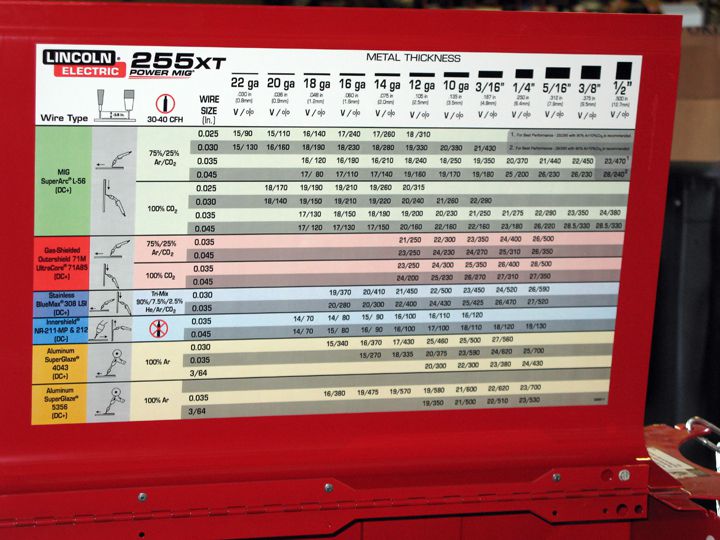
Credit: www.driveonline.com
Key Lincoln Welder Settings Explained
To use a settings chart well, you need to understand what each setting does.
Voltage
Voltage controls the arc’s length and heat. Higher voltage makes a wider, flatter weld bead. Lower voltage gives a narrow, tall bead. Too much voltage can cause spatter and lack of control. Too little can make the wire “stub” into the metal.
A common mistake is to turn up the voltage too high, thinking it will always give better penetration. In reality, too much voltage can make your bead too wide and produce undercut (a groove at the toe of the weld).
On the other hand, if your voltage is too low, you might see the wire pushing into the workpiece without melting properly, causing an unstable arc.
Amperage
Amperage is the main setting for Stick and TIG welding. It controls how much current flows through the arc. More amperage means more heat and deeper penetration. Less amperage gives a smaller, shallower bead.
With Stick welding, the right amperage depends on both the rod size and position (flat, vertical, overhead). For example, welding flat with a 1/8” rod often needs about 125 amps, but welding vertical might need only 100 amps to avoid too much heat.
Wire Feed Speed
For MIG welders, the wire feed speed controls how fast the wire goes into the weld. Too fast and you get spatter; too slow and the wire burns back into the tip.
A good trick is to listen to the sound. A steady “sizzling” noise means you’re close. If you hear loud popping, your wire feed speed is probably too high. If the arc keeps stopping, the speed may be too low.
Gas Flow Rate
Some welding processes need shielding gas to protect the weld from air. The chart will show the best flow rate, usually in cubic feet per hour (CFH) or liters per minute (L/min).
Too much gas flow can actually cause turbulence and pull air into your weld. Too little flow will not protect the weld, causing porosity (tiny holes in the bead). Most welders use between 20–25 CFH for MIG, but always check your chart.
Electrode Or Wire Size
The diameter of the electrode or wire affects how much current you can use. Thicker wire needs more power and gives deeper penetration.
For example,. 023” wire is great for thin sheet metal because it allows fine control and low heat. . 035” wire is better for thicker metal, giving you a hotter arc and faster travel speed.
How To Read A Lincoln Welder Settings Chart
Many beginners look at a settings chart and feel lost. But it’s simple if you know how to use it:
- Find your material type (like steel or aluminum).
- Check the thickness of your workpiece.
- Look for the correct wire or electrode size.
- Set your voltage/amperage and wire feed speed as shown.
- Adjust gas flow rate if using a shielding gas.
Most charts give a range, not a single number. Start in the middle of the range, then test on scrap metal and adjust up or down as needed.
If you are welding outside and there is wind, you may need to increase your gas flow a little more than the chart says. Or, if your shop is warm and calm, you might use the lower end of the range.
Don’t be afraid to write down your favorite settings for special jobs. Over time, you’ll build confidence in using charts and fine-tuning by eye and ear.
Example Lincoln Welder Settings Chart For Mig Welding
Below is a sample chart for a common Lincoln MIG welder (using .030” wire and C25 gas):
| Material Thickness | Wire Size | Voltage (V) | Wire Feed Speed (ipm) | Gas Flow (CFH) |
|---|---|---|---|---|
| 18 gauge (1.2 mm) | .030” | 16-17 | 200-225 | 20-25 |
| 16 gauge (1.6 mm) | .030” | 17-18 | 240-260 | 20-25 |
| 1/8” (3.2 mm) | .030” | 18-19 | 340-360 | 25 |
| 1/4” (6.4 mm) | .035” | 20-22 | 400-450 | 25 |
Start with these numbers, then adjust based on your weld’s look and feel.
If your weld bead is sitting on top without melting in, raise your voltage slightly or slow down your travel. If you see burn-through, lower the voltage or move faster. Always use a piece of scrap to test before starting on your real work.
Mig Vs. Stick Vs. Tig Settings
Different welding methods need different setups. Here is a quick comparison:
| Process | Main Settings | Adjustment Range | Best For |
|---|---|---|---|
| MIG | Voltage, Wire Feed, Gas | Flexible | Thin to medium metal, speed |
| Stick | Amperage, Electrode Type | Wide | Thicker steel, outdoor work |
| TIG | Amperage, Gas, AC/DC | Precise | Thin materials, aluminum |
Each process has its own strengths and weaknesses. MIG is easy for beginners and works well for most shop jobs. Stick is simple and works outdoors. TIG offers the most control but takes more skill.
For example, if you are repairing a farm gate outside, Stick is likely the best choice because wind does not affect it much. For welding a thin stainless sink, TIG will give you a clean, strong bead with less risk of burning through.

Credit: www.weldingweb.com
Setting Your Lincoln Welder For Common Materials
Let’s look at how to use the settings chart for different metals.
Mild Steel
Mild steel is the most common metal for welding. It is forgiving and works well with all processes.
- Use C25 gas (75% CO2, 25% Argon) for MIG.
- For 1/8” steel, set voltage to 18V, wire speed to 300 ipm (.030” wire), and gas to 25 CFH.
- For Stick, use 6011 or 7018 rods at 90-120 amps, depending on rod size.
Mild steel can handle some mistakes in settings, but you should still clean the surface for best results. If you see a lot of spatter, check your voltage and wire speed—they may be too high.
Stainless Steel
Stainless steel needs more care. Use a tri-mix gas (90% helium, 7.5% argon, 2.5% CO2) for MIG.
- For 16 gauge, set voltage at 18V, wire speed at 200 ipm (.030” wire).
- For TIG, use DC current, set amps to 50-70 for thin sheet.
Stainless steel shows heat marks (bluing) easily, so keep your heat as low as possible. Move quickly and avoid stopping in one place too long.
Aluminum
Aluminum conducts heat quickly. Use pure argon gas.
- For 1/8” aluminum, set voltage to 18-20V, wire speed to 350-400 ipm (use 4043 or 5356 wire).
- For TIG, use AC current, set amps to 125-150, and use a sharpened tungsten.
Aluminum is less forgiving than steel. If your settings are too cold, the weld will not bond well. Too hot, and you will get burn-through. Clean the oxide layer from aluminum before welding for a better result.
Galvanized Steel
Galvanized steel gives off dangerous fumes. Weld in a well-ventilated area.
- Use the same settings as for mild steel, but lower the heat slightly.
- Always grind off the coating before welding.
Many beginners do not know that the zinc coating causes toxic fumes. Always wear a proper mask and work with good airflow.
Common Wire And Electrode Sizes For Lincoln Welders
Choosing the right wire or rod is as important as the settings. Here’s a quick guide:
| Wire/Electrode Size | Best Metal Thickness | Amperage Range |
|---|---|---|
| .023” MIG wire | 24 ga – 18 ga | 30–90 A |
| .030” MIG wire | 22 ga – 1/8” | 40–145 A |
| .035” MIG wire | 16 ga – 1/4” | 50–180 A |
| 1/8” Stick rod | 1/8” – 1/4” | 90–140 A |
| 3/32” Stick rod | 1/16” – 1/8” | 40–90 A |
Always match your wire or rod size to your job for best results.
If you use a large wire on thin metal, you will burn through or warp your work. If you use a small wire on thick plate, you may not get enough heat for a strong weld.
How To Adjust Lincoln Welder Settings In Practice
Setting your machine is not just about following numbers. Real conditions, like extension cord length, joint type, and metal surface, can change your results. Here’s a simple method to dial in your settings:
- Select wire/rod and gas based on your material.
- Set voltage/amperage to the middle of the chart’s range.
- Set wire feed speed (for MIG) to the chart’s suggestion.
- Weld on a scrap piece of the same material.
- Check the bead: If it’s tall and narrow, increase heat. If it’s flat and wide, decrease.
- Listen to the arc: A good MIG arc sounds like frying bacon. Too much popping means wire speed is too high.
- Check for burn-through or lack of fusion and adjust accordingly.
Also, pay attention to your welding position. Welding overhead or vertically often requires slightly lower heat to avoid sagging or dripping. If you move from a thick section to a thin one, reduce voltage and wire speed slightly to prevent burn-through.
Keeping a small notebook to track your “best settings” for different jobs can save time later.
Common Mistakes When Using Lincoln Welder Settings Charts
Many users make the same errors:
- Ignoring metal cleanliness. Dirty metal causes poor welds, even with perfect settings.
- Sticking to chart numbers too strictly. Charts are starting points—always fine-tune for your setup.
- Using the wrong wire or rod. This causes weak welds or excess spatter.
- Forgetting gas flow. Too much or too little gas causes porosity or wasted gas.
- Not adjusting for position. Overhead or vertical welds need lower heat than flat welds.
Another mistake is not checking the condition of your welding torch, tip, or electrode holder. A worn contact tip can create arc problems, even if your settings are correct. Also, remember that old wire can get rusty and affect your weld quality—always use clean, fresh wire for the best results.

Credit: www.arccaptain.com
Advanced Tips For Getting The Most From Your Lincoln Welder
Some insights can help you get better results:
- Ambient temperature affects settings. Cold metal needs more heat; hot shop air needs less.
- Extension cords reduce power. If you use a long cord, increase voltage or amperage slightly.
- Joint type matters. Open root joints need more heat than lap joints.
- Test on scrap every time you change material or position.
A common mistake is to skip practice beads. Even pros test settings on scrap before welding important parts.
Another useful tip: keep your work clamp clean and tight against bare metal. A poor ground connection causes arc problems that look like bad settings. If you see the arc cutting in and out, check your ground first.
Lincoln Welder Settings For Special Jobs
Some projects need special care:
Thin Sheet Metal
Thin metal burns through easily. Use lower voltage and faster travel speed. For auto body panels (22-18 gauge), set voltage to 15V and wire speed to 100-150 ipm with. 023” wire.
If you have trouble with warping, use small tack welds and let the metal cool between passes.
Thick Plate
Thick steel (over 1/4”) needs high voltage and multiple passes. Use. 035” or. 045” wire, voltage of 22-26V, and wire speed 400-550 ipm.
Preheat thick plates with a torch if you notice cracking or lack of fusion.
Out-of-position Welds
Vertical or overhead welds need less heat and slower wire speed. Start with settings 10-20% lower than flat welds.
Use a “whipping” motion with Stick or MIG to control the puddle.
Aluminum Boat Repairs
Weld aluminum boats with AC TIG or spool gun MIG. Use pure argon at 20-25 CFH, set amps to 120-150 for 1/8” hulls.
Clean the area well and avoid welding near fuel or paint.
Stainless Railings
For TIG, use 308L rod, set amps to 60-80 for 1/16” railings, and use a gas lens for better coverage.
Keep the weld area clean and use a dedicated brush for stainless only.
How To Make Your Own Lincoln Welder Settings Chart
Every welder works a bit differently. Make your own settings chart for your most common jobs:
- Keep a notebook by your machine.
- Record each job: Material, thickness, wire/rod size, voltage, wire speed, gas.
- Note what worked and what did not.
- Over time, you’ll have a custom chart that fits your machine and style.
This is something many beginners never do, but it can save hours of frustration.
Also, include notes about special situations (like outdoor jobs or odd joint types) so you can repeat your success later.
Where To Find Official Lincoln Welder Settings Charts
Lincoln Electric provides many charts and guides for their machines.
- Check your machine’s door for a basic chart.
- Download the manual from the Lincoln Electric website. Manuals include detailed settings.
- Use the Weld Navigator tool on their site for step-by-step help.
- Visit Lincoln Electric for official charts and tips.
If you have an older machine, the website has charts for legacy models too. You can also contact Lincoln’s support for help with special settings.
Safety When Setting Up Your Lincoln Welder
Good settings improve safety. Too much heat can damage your work, while too little can cause welds to break. Always:
- Wear proper PPE (helmet, gloves, jacket).
- Check all cables and gas connections.
- Weld in a ventilated area, especially for galvanized or painted metal.
- Keep a fire extinguisher nearby.
Never weld in wet conditions or near flammable materials. If you are unsure, ask a more experienced welder or supervisor before starting.
Real-world Examples
Example 1: Repairing A Trailer Frame
Material: 1/8” Mild Steel
Process: Mig
Settings: 18V, 320 ipm, .030” wire, C25 gas at 25 CFH
Result: Smooth bead, no burn-through, strong weld.
The welder started with chart settings and adjusted wire speed until the bead looked good. Cleaning rust and paint from the joint before welding made a clear difference in strength.
Example 2: Welding Stainless Sink
Material: 16 Gauge Stainless
Process: Tig
Settings: 60 Amps, Dc, 308l Rod, Argon At 15 Cfh
Result: Clean, smooth bead, no warping.
The welder paused between passes to avoid heat buildup. This kept the sink from warping and left a neat, professional appearance.
Example 3: Building An Aluminum Gate
Material: 1/4” Aluminum
Process: Mig With Spool Gun
Settings: 22v, 450 Ipm, 4043 Wire, Argon At 25 Cfh
Result: Good penetration, minimal spatter.
The welder cleaned the aluminum with a stainless brush and used a test piece to dial in settings before starting the real work.
How To Troubleshoot Bad Welds
If your welds look bad, check these:
- Porosity (holes): Too little gas or drafts. Raise flow or block wind.
- Spatter: Too much wire speed or voltage. Lower one or both.
- Undercut: Too much heat or too fast travel. Slow down or reduce voltage.
- Lack of Fusion: Not enough heat. Raise voltage/amperage.
Always adjust one thing at a time. Use your settings chart as a reference, but trust what you see and hear.
If you have repeated problems, check your ground clamp and cable connections, as loose connections can cause erratic arcs. Also, change your contact tip if it looks worn.
Updating Your Skills
Welding is a skill you keep learning. Lincoln Electric offers training and videos on their site. Try new settings, read your bead, and ask other welders for advice. The more you practice, the easier it becomes to use any settings chart.
You can also join online forums or local welding clubs to see how others set up for special projects. Watching others weld and asking questions gives you ideas to try in your own shop.
Frequently Asked Questions
What If My Lincoln Welder Does Not Have A Settings Chart?
If your machine does not have a chart, check the manual or look online. The Lincoln Electric website has charts for all models. You can also use the general guidelines in this article to start.
Can I Use The Same Settings For All Metals?
No, each metal needs different voltage, wire speed, and gas. Always check the chart for your specific metal and thickness.
Why Do My Welds Have Holes Or Porosity?
Porosity comes from bad shielding gas coverage or dirty metal. Make sure you use enough gas and clean your work before welding.
How Do I Know If My Settings Are Right?
A good weld looks smooth, has even ripples, and matches the width of your joint. The sound should be steady (for MIG), and there should be little spatter.
Where Can I Find More Lincoln Welder Settings Charts?
Visit the official Lincoln Electric website for the latest charts and manuals.
Welding gets easier with the right information. Use your Lincoln welder settings chart as a starting point, but always test and adjust for your real job. The more you practice, the better your welds will be. With time, you will set your machine with confidence and get strong, clean results every time.