Disclosure: This post contains affiliate links and I will be compensated if you make a purchase after clicking through my links. Learn More
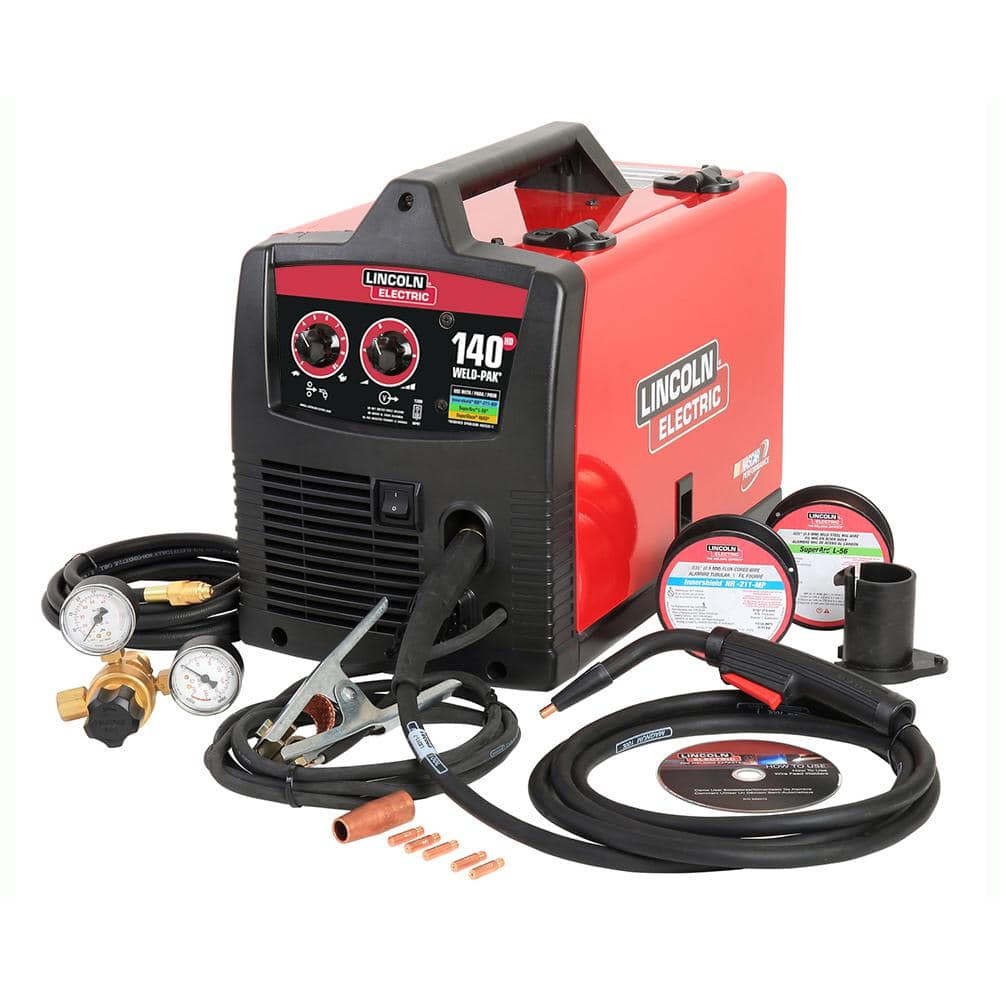
Setting up a Lincoln 140 MIG welder can seem overwhelming if you’re new to welding. But with the right steps and some patience, you can get your machine ready for strong, clean welds. The Lincoln 140 is a popular choice for beginners and hobbyists because it’s reliable, compact, and easy to use for light fabrication, repairs, and automotive work. This article will guide you through every part, adjustment, and procedure, from unpacking the box to making your first weld. You’ll learn about each component, how to assemble and connect everything, and how to set the right controls for your specific welding project. Whether you want to join thin sheet metal or tackle small home repairs, following these steps will help you use your Lincoln 140 confidently and safely.
1. Unboxing The Lincoln 140 Mig Welder
Start by carefully removing the welder and its accessories from the box. Check that all items are present:
- Lincoln 140 MIG welder unit
- Power cord
- Ground clamp
- MIG torch and cable
- Gas hose and regulator
- Sample spool of wire
- Contact tips
- Drive rolls
- User manual
Inspect for any shipping damage. Make sure nothing is missing or broken before continuing.
2. Placing The Welder
Choose a stable, flat surface for the welder. Keep the machine away from flammable items and ensure good ventilation. Place the unit close to a 120V outlet, since the Lincoln 140 uses standard household power.
3. Connecting The Power Cord
Plug the power cord into a grounded 120V outlet. Do not use extension cords unless they are heavy-duty and rated for high current.
4. Attaching The Ground Clamp
Connect the ground clamp to the welder’s negative terminal. Attach the other end to a clean, bare metal surface on your workpiece. A solid ground is essential for stable arcs and safety.
5. Assembling The Mig Torch
Uncoil the MIG torch cable. Attach the torch connector to the front of the welder. Tighten it by hand. Make sure the trigger connection clicks into place. Do not twist or kink the cable.
6. Installing The Wire Spool
Open the side panel of the welder. Place the wire spool on the spindle. The wire should feed from the bottom of the spool towards the drive roll. Secure the spool with the retaining nut, but do not overtighten.
7. Setting Up The Drive Roll
Check the drive roll. For solid wire, use a smooth groove; for flux-cored wire, use a knurled groove. Align the drive roll with the wire size you plan to use (usually .025″ or .030″).
8. Threading The Welding Wire
Cut the end of the wire cleanly with wire cutters. Release the tension arm. Feed the wire through the inlet guide, across the drive roll, and into the liner. Push about 4-6 inches into the torch.
9. Adjusting Wire Tension
Close the tension arm and set the pressure just enough to grip the wire. Too much tension can crush the wire; too little will cause slipping. Test by pulling the wire by hand; it should not slip, but should not feel forced.
10. Installing The Contact Tip
Choose a contact tip that matches your wire diameter. Screw the tip onto the torch end. The wire should slide through the tip easily but without excess play.
11. Attaching The Nozzle
Push the MIG nozzle onto the torch, covering the contact tip. The nozzle focuses shielding gas and protects your hand from spatter.
12. Connecting Shielding Gas
Attach the gas regulator to your gas cylinder (usually 100% CO2 or a mix of 75% Argon/25% CO2). Tighten the regulator with a wrench. Connect the gas hose from the welder to the regulator.
13. Opening The Gas Cylinder
Slowly open the cylinder valve. Set the regulator to 20-25 cubic feet per hour (CFH). Check for leaks by listening for hissing or using soapy water on connections.
14. Checking The Gas Flow
Press the torch trigger briefly. You should hear gas flowing. If not, recheck hose connections and regulator settings.
15. Selecting Wire Type
Choose solid MIG wire for clean metal with shielding gas, or flux-cored wire for outdoor or dirty metal, which does not need gas.
16. Checking Polarity
For solid wire with shielding gas, connect the torch to the positive terminal (DCEP). For flux-cored wire, connect the torch to the negative terminal (DCEN). Swap the leads inside the welder if needed.
17. Cleaning The Work Surface
Remove rust, paint, and oil from the area to be welded. A clean surface gives better welds and prevents contamination.
18. Checking Ventilation
Ensure the area has fresh air and no gas buildup. Welding fumes can be dangerous. Use a fan or open windows if necessary.
19. Adjusting Wire Feed Speed
Set the wire feed speed knob according to the material and wire size. Too fast will cause spatter; too slow will cause the wire to burn back.
20. Setting Voltage
Turn the voltage knob to match your metal thickness. Lincoln provides a chart inside the side panel as a reference.
21. Checking Reference Chart
Open the side panel and find the setup chart. It lists recommended voltage and wire speed for common metals and thicknesses.
22. Installing The Correct Drive Roll
Make sure you have the right groove for your wire. The wrong drive roll can cause feeding problems and poor welds.
23. Cutting The Welding Wire
Use wire cutters to snip the end of the wire so it’s straight and clean. This helps with smooth feeding.
24. Purging The Gas Line
Press the torch trigger for a few seconds (without welding) to clear air from the gas line.
25. Checking Wire Alignment
Confirm that the wire enters the contact tip smoothly, without bending or catching.
26. Setting Up A Test Piece
Use a scrap piece of metal similar to your project. This lets you test settings before starting your real work.
27. Wearing Protective Gear
Put on a welding helmet, gloves, long sleeves, and sturdy shoes. Do not weld without proper protection.
28. Checking Helmet Shade
Set your helmet to the correct shade (usually 10–12 for MIG welding) to protect your eyes from the arc.
29. Setting Up A Welding Table
Use a metal table if possible. Wood or plastic tables can catch fire and may not provide a good ground.
30. Securing The Workpiece
Clamp your metal pieces firmly so they do not move during welding.
31. Checking Cable Connections
Inspect all cables for damage or loose connectors. Replace or tighten as needed before welding.
32. Testing The Torch Trigger
Press the trigger and listen for the click, gas flow, and wire feed. This checks if the system is ready.
33. Checking For Gas Leaks
Use soapy water on all gas connections. Bubbles mean a leak—tighten fittings if needed.
34. Confirming Ground Connection
The ground clamp must touch clean, bare metal. Poor ground causes weak arcs and spatter.
35. Setting Initial Parameters
Use the reference chart or Lincoln’s manual to set starting voltage and wire speed based on your wire and metal.
36. Testing Wire Feed
Press the trigger with the nozzle off. The wire should feed smoothly, not jerk or stop.
37. Trimming Wire Before Welding
Clip the wire so about 1/4 inch extends from the contact tip before starting each weld.
38. Checking The Gas Type
Confirm you’re using the right gas for your wire (CO2 or Argon mix for solid wire, none for flux-cored).
39. Confirming Polarity Swap
Double-check your torch and ground connections match the wire type (DCEP for solid, DCEN for flux-cored).
40. Checking Regulator Pressure
Ensure the regulator shows enough gas pressure—do not let the cylinder run empty.
41. Inspecting The Torch Liner
A dirty or kinked liner can block the wire. Replace if you see feeding issues.
42. Checking For Spatter Build-up
Clean the nozzle and tip if spatter collects, as it can block gas flow.
43. Using Anti-spatter Spray
Spray a light coat inside the nozzle to reduce spatter build-up.
44. Checking The Welder Fan
The cooling fan should start when you turn on the welder. If not, check for blockages or faults.
45. Verifying Input Voltage
If lights flicker or the welder loses power, check your outlet and breaker.
46. Checking For Extension Cord Drops
If you must use an extension cord, use one rated for at least 20 amps. Shorter cords are better.
47. Reading The User Manual
Review the Lincoln manual for your model for diagrams, troubleshooting, and maintenance tips.
48. Watching For Error Codes
If your welder has a digital display, note any error codes and check the manual for solutions.
49. Keeping The Area Clean
Remove clutter and tripping hazards from your workspace.
50. Organizing Consumables
Keep extra tips, nozzles, and wire nearby so you can make quick changes if needed.
51. Checking Drive Motor
If wire does not feed, listen for the drive motor. If silent, check connections or for jammed wire.
52. Verifying Torch Switch Operation
If the torch does not start, inspect the trigger switch for damage or loose wiring.
53. Cleaning The Ground Clamp
Wipe the clamp jaws clean for the best electrical contact.
54. Checking For Overheating
Let the welder cool if it overheats or shuts down. Don’t block the fan vents.
55. Inspecting The Power Cord
Check for cuts or exposed wires. Replace if damaged.
56. Checking Internal Fuses
If the welder does not power up, check for blown fuses inside the unit.
57. Confirming Circuit Breaker Rating
Use a 20-amp circuit for best results. Lower-rated circuits may trip during welding.
58. Checking Work Lead Length
Use the shortest ground cable possible for less resistance and better welds.
59. Inspecting Gas Hose
Replace cracked or leaking hoses immediately.
60. Confirming Regulator Fit
Regulator threads must match your gas cylinder. Do not force mismatched parts.
61. Checking Gas Cylinder Stability
Secure the gas bottle upright to prevent tipping.
62. Storing Spare Wire
Keep wire spools in a dry place to avoid rust.
63. Avoiding Wire Kinks
Feed wire gently to avoid bends or tangles.
64. Cleaning Contact Tips
Burned or clogged tips should be replaced or cleaned with a tip cleaner.
65. Using Correct Nozzle Size
Use a nozzle that matches your torch and provides good gas coverage.
66. Checking Wire Guide Alignment
Wire should travel straight from spool to drive roll to liner.
67. Checking Liner Length
Too-long or short liners can cause feeding trouble; use the right length for your torch.
68. Watching For Birdnesting
If wire bunches up at the drive roll, check tension, liner, and guide.
69. Checking Gun Neck Insulation
Make sure insulation is intact to prevent electric shock.
70. Confirming Torch-to-work Distance
Hold the torch about 3/8 inch from the workpiece for best results.
71. Maintaining Steady Travel Speed
Move at a consistent speed; too fast or slow affects weld quality.
72. Practicing On Scrap Metal
Use scrap to test settings and technique before welding your project.
73. Watching Weld Pool
Focus on the molten pool, not the arc, for better control.
74. Listening For Stable Arc Sound
A steady, “sizzling bacon” sound means proper settings.
75. Watching For Undercut
If weld edges are gouged, reduce voltage or increase travel speed.
76. Checking For Porosity
Holes in the weld indicate gas coverage problems—recheck flow and nozzle.
77. Avoiding Excessive Spatter
Fine-tune voltage and wire speed to minimize spatter.
78. Monitoring Bead Shape
Aim for a smooth, even bead without ridges or dips.
79. Adjusting For Vertical Welding
Use a lower voltage and faster travel for vertical welds.
80. Adjusting For Overhead Welding
Keep the weld pool small; use quick passes.
81. Checking Shielding Gas Quality
Use fresh, clean gas. Moisture or oil in the gas line can cause weld flaws.
82. Storing Gas Cylinder Properly
Store cylinders in a cool, upright position and chain them securely.
83. Using The Right Gas Mix
For mild steel, use 75% Argon/25% CO2 for cleaner welds.
84. Avoiding Welding In Wind
Wind blows away shielding gas. Weld indoors or use wind breaks outside.
85. Checking For Cracked Welds
If welds crack, check for contamination or poor fit-up.
86. Cleaning After Each Weld
Chip off slag and wire brush the weld for inspection.
87. Avoiding Burn-through
Lower voltage or wire speed on thin metal to prevent holes.
88. Setting The Inductance (if Available)
Some models allow fine-tuning arc softness—adjust for less spatter or smoother beads.
89. Using Multi-pass Welds
For thick metal, use multiple layers for full strength.
90. Avoiding Cold Lap
Ensure the weld melts into both pieces. Raise voltage or slow down if needed.
91. Checking Duty Cycle
The Lincoln 140 has a 20% duty cycle at 90 amps. Weld for 2 minutes, then let cool for 8 minutes.
92. Monitoring Machine Temperature
If the welder shuts off, let it cool before restarting.
93. Replacing Consumables Regularly
Change tips, nozzles, and liners when worn to keep performance high.
94. Watching For Dirty Power
Voltage drops can cause erratic performance—use a steady, dedicated circuit.
95. Storing The Welder Safely
Store indoors to avoid moisture and dust buildup.
96. Locking Out Power Before Maintenance
Unplug the welder before changing parts or opening the case.
97. Avoiding Cross-threading
Start threads by hand for tips, nozzles, and regulators.
98. Using Proper Lighting
Bright lighting helps you see the weld pool and work area.
99. Marking Weld Joints
Mark cut lines and joints with chalk for better accuracy.
100. Cleaning Weld Joints
Grind or brush edges before welding for a strong bond.
101. Checking For Loose Screws
Tighten mounting screws on the torch, ground clamp, and panels.
102. Using A Chipping Hammer
Use a hammer to knock off slag from flux-cored wire welds.
103. Brushing Welds
A wire brush cleans up slag and reveals weld quality.
104. Avoiding Over-grinding
Too much grinding can weaken welds—use only as needed.
105. Inspecting Welds Visually
Look for cracks, holes, or unevenness after each weld.
106. Using A Magnet To Test Welds
A strong weld will hold a magnet; weak welds may not.
107. Checking For Wire Rust
Rusty wire causes feeding issues and weld flaws—store wire dry.
108. Listening For Gas Leaks
A faint hiss can signal a leak; fix leaks before welding.
109. Keeping Hands Dry
Wet hands can cause electric shock—wear dry gloves.
110. Avoiding Touching The Electrode
Do not touch the wire while welding; it carries current.
111. Lifting The Welder Safely
Use handles and lift with your legs, not your back.
112. Using Fire-resistant Clothing
Synthetic fabrics can melt; use cotton or leather.
Credit: www.homedepot.com
113. Keeping A Fire Extinguisher Nearby
Welding can cause sparks—have an extinguisher ready.
114. Checking For Flammable Vapors
Do not weld near gasoline, solvents, or vapors.

Credit: www.youtube.com
115. Checking For Tripped Breakers
If welder loses power, check your circuit breaker first.
116. Avoiding Overloading Outlets
Do not share the welder outlet with other heavy appliances.
117. Labelling Gas Cylinders
Mark cylinders so you do not mix up gas types.
118. Using Teflon Tape On Gas Fittings
Wrap threads to prevent leaks on regulators and hoses.
119. Ensuring Proper Gas Flow Direction
Gas should flow from the cylinder to the torch—never reverse hoses.
120. Testing Weld Strength
Bend test a sample weld to check for proper penetration.

Credit: www.lincolnelectric.com
121. Checking For Electrical Noise
Nearby appliances can cause interference; keep the welding area clear.
122. Avoiding Long Power Cords
Long cords cause voltage drops. Use the shortest cord possible.
123. Cooling Welds Slowly
Rapid cooling can cause cracks; let parts cool at room temperature.
124. Avoiding Welding Galvanized Steel
Galvanized steel releases toxic fumes—remove zinc coating first.
125. Using A Welding Cart
A cart makes moving the welder and gas cylinder easier and safer.
126. Checking For Torch Overheating
If the torch gets hot, take a break to cool it.
127. Avoiding Pinched Hoses
Keep hoses straight and free of heavy objects.
128. Using A Torch Holder
Rest the torch on an insulated holder when not in use.
129. Checking For Arc Blow
If the arc wanders, reposition the ground clamp or adjust settings.
130. Keeping The Drive Roll Clean
Wipe the roll regularly to prevent wire slippage.
131. Using A Digital Caliper
Measure metal thickness and wire diameter for accurate settings.
132. Avoiding Welding In Rain
Water increases electric shock risk; weld only in dry areas.
133. Replacing The Torch Liner
If wire jams persist, replace the liner for smooth feeding.
134. Checking For Broken Knobs
Replace damaged control knobs for safe operation.
135. Using A Fume Extractor
A fume extractor reduces exposure to welding fumes.
136. Keeping The User Manual Handy
Refer to the manual for troubleshooting and setup questions.
137. Using A Welding Apron
An apron provides extra protection for your body.
138. Keeping Kids And Pets Away
Never allow children or animals near the welding area.
139. Tracking Consumable Usage
Log when you change tips, nozzles, and wire to plan replacements.
140. Registering Your Welder
Register your product with Lincoln for warranty and support. You can do this on their official site or by mail. For more information, check the Lincoln Electric official website.
Lincoln 140 Mig Welder: Comparison And Setup Data
Below is a comparison of some key specs and settings for the Lincoln 140 MIG welder:
| Feature | Lincoln 140 MIG | Typical Entry-Level MIG |
|---|---|---|
| Input Voltage | 120V | 120V |
| Output Range | 30-140A | 30-130A |
| Duty Cycle | 20% @ 90A | 15% @ 90A |
| Wire Capacity | .025″–.035″ | .023″–.035″ |
| Max Material Thickness | 5/16″ (steel) | 1/4″ (steel) |
| Weight | ~62 lbs | ~55 lbs |
Here’s a quick reference for setting up the Lincoln 140 for different metal thicknesses:
| Material Thickness | Voltage Setting | Wire Speed (ipm) | Wire Size |
|---|---|---|---|
| 18 gauge | B–C | 150–200 | .025″ |
| 1/8″ | D–E | 250–350 | .030″ |
| 1/4″ | Max | 350–400 | .035″ |
Safety And Maintenance Tips
Proper setup is only half the work. Consistent safety checks and maintenance keep your Lincoln 140 running smoothly:
- Wear all required safety gear.
- Inspect cables, hoses, and clamps before each use.
- Clean nozzles and tips frequently.
- Store wire and gas properly.
- Never weld in a poorly ventilated space.
Frequently Asked Questions
How Do I Know If My Lincoln 140 Mig Welder Is Set Up Correctly?
Check the wire feeds smoothly, the gas flows when you press the trigger, and the ground clamp is secure. Test on scrap metal to confirm stable arcs and clean welds.
What Gas Should I Use With The Lincoln 140?
Use a 75% Argon/25% CO2 mix for most mild steel projects. 100% CO2 is cheaper but creates more spatter. Flux-cored wire does not need shielding gas.
How Often Should I Replace Consumables On My Mig Welder?
Replace contact tips, nozzles, and liners when you notice feeding problems, excess spatter, or worn parts. Frequent checks help avoid sudden failures.
Can I Use The Lincoln 140 On Thick Steel?
The Lincoln 140 is best for metals up to 5/16″ thick. For thicker steel, use multi-pass welds or a higher-output machine.
Why Does My Wire Keep Jamming?
Check for correct drive roll, proper tension, and a clean torch liner. Make sure your wire is not rusty or kinked.
Setting up your Lincoln 140 MIG welder carefully makes welding easier, safer, and more enjoyable. Each part and step matters. With clear setup and regular maintenance, your machine will deliver reliable performance for years. For more in-depth technical information, visit the official Lincoln Electric product page.