Disclosure: This post contains affiliate links and I will be compensated if you make a purchase after clicking through my links. Learn More
Hobart welders are popular for their reliability and performance. Many shops and DIY users trust these machines for welding projects. But even the best machines can have issues. One of the most common problems is with the wire feed system. If the wire feed does not work smoothly, your weld quality drops fast. Poor wire feeding leads to weak welds, spatter, and frustration. Many users face these problems, whether they are new or experienced.
This article explains the main wire feed problems with Hobart welders. You will learn why they happen, how to fix them, and how to prevent them. The guidance here works for models like the Handler 140, Handler 190, and Ironman series.
You will also find tables to compare causes and solutions, simple troubleshooting steps, and answers to common questions. By the end, you will be able to handle most wire feed issues with confidence.
How The Hobart Wire Feed System Works
A Hobart wire feed welder uses an electric motor to push welding wire through a liner to the torch. The wire comes from a spool. You press the trigger, and the wire moves out for welding. The system needs proper tension, a clean path, and the right settings.
Key parts in the system:
- Wire spool: Holds the welding wire.
- Drive rolls: Grip and push the wire.
- Wire liner: Guides the wire through the cable to the torch.
- Torch: Delivers the wire and shielding gas to the weld.
If any of these parts have problems, the wire feed may slow down, jam, or stop.
Common Hobart Welder Wire Feed Problems
Most wire feed issues fall into a few main groups. Each group has several possible causes. Here are the most frequent problems:
1. Wire Feeds Unevenly Or Slips
Uneven feeding causes the arc to sputter. Sometimes the wire stops and starts. Other times, it slips and moves too fast or too slow.
Why this happens:
- Drive roll tension is too loose or too tight.
- Worn or incorrect drive rolls.
- Dirty or rusty wire.
- Blocked or worn liner.
2. Wire Does Not Feed At All
You pull the trigger, but the wire does not move. The motor may hum, or nothing happens.
Possible reasons:
- Broken trigger switch.
- Faulty wire feeder motor.
- Loose or broken wiring.
- Jammed wire in the liner.
3. Birdnesting
Birdnesting means the wire tangles at the feed point. It looks like a small nest of wire. This stops the wire completely.
Typical causes:
- Wrong drive roll size.
- Liner too large or dirty.
- Wire tension set too high.
- Feeding soft wire (like aluminum) without the correct liner.
4. Burnback
Burnback happens when the wire melts back into the tip. The arc stops, and you may damage the contact tip.
Main reasons:
- Wire feed speed too low.
- Holding the torch too close.
- Dirty or worn contact tip.
5. Wire Feeds But Arc Is Weak Or Unstable
The wire moves, but the arc is weak, or there is a lot of spatter.
Why this happens:
- Wrong polarity.
- Poor ground connection.
- Wire is not contacting the tip properly.

Credit: www.youtube.com
Causes And Solutions: Quick Comparison
To help you spot problems fast, here is a table that links common wire feed problems with their causes and fixes:
| Problem | Common Causes | Solution |
|---|---|---|
| Wire feeds unevenly | Drive roll tension wrong, dirty wire, worn rolls | Adjust tension, clean wire, replace rolls |
| No wire feed | Broken switch, motor, wiring, jammed liner | Check and replace parts, clear liner |
| Birdnesting | Wrong drive roll, bad liner, tension too high | Use correct roll, clean/replace liner, adjust tension |
| Burnback | Low speed, torch too close, bad tip | Increase speed, proper torch distance, new tip |
| Weak/unstable arc | Wrong polarity, bad ground, tip contact | Check polarity, clean ground, check tip |
Detailed Troubleshooting Steps
Solving wire feed problems requires a step-by-step process. Start with the simplest checks before moving to deeper parts.
Check The Wire Spool And Feed Path
- Look at the wire spool. Make sure it is not tangled or stuck.
- Check the wire type and size. Use the right wire for your welder and material.
- Inspect the wire for rust or dirt. Clean or replace if needed.
- Check that the spool turns freely. The brake should not be too tight.
Inspect The Drive Rolls
- Open the drive roll cover. Look for dirt, worn spots, or damage.
- Make sure the drive roll matches the wire size. A mismatch causes slipping.
- Check drive roll tension. Too loose: Wire slips. Too tight: wire deforms.
- Clean the drive roll grooves. Use a brush to remove dust and debris.
Check The Wire Liner
- Disconnect the liner from both ends. Pull the wire out.
- Blow out the liner with compressed air. Dirt or metal shavings block the path.
- Replace the liner if worn or kinked. Liners wear out over time.
- Use the correct liner for the wire. Steel liners for steel, Teflon for aluminum.
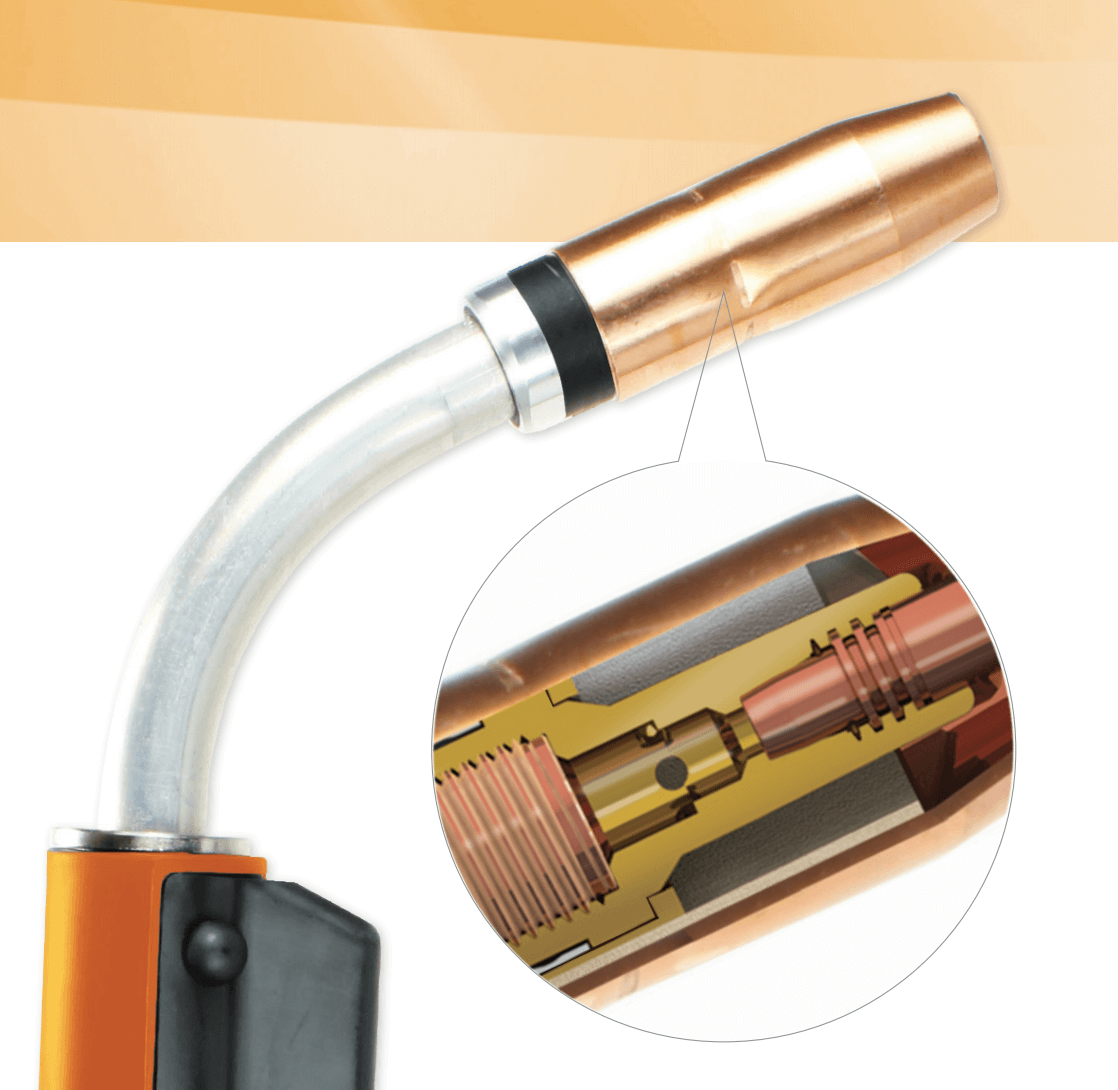
Inspect The Gun And Contact Tip
- Remove the contact tip. Look for burnback or blockage.
- Replace tips that are dirty or burned. Tips are cheap and easy to change.
- Check the gun neck and cable. Sharp bends can stop wire feed.
Test The Trigger And Motor
- Press the trigger and listen. If the motor hums but does not turn, check wiring.
- Test with a different gun if possible. This tells you if the problem is in the torch or machine.
- Check wiring connections inside the welder. Loose wires cause failure.
Adjust Settings
- Set the correct wire feed speed. Too low can cause burnback.
- Choose the right voltage and wire speed for your material. Use the chart inside the welder cover.
- Check the polarity. Most solid wire uses DCEP (electrode positive).
Credit: americantorchtip.com
Table: Signs Of Wire Feed Problems And What They Mean
| Sign | What It Means | Possible Fix |
|---|---|---|
| Wire stutters | Drive roll or liner issue | Check roll tension, clean liner |
| Wire jams at torch | Contact tip or liner blocked | Clean/replace tip, clear liner |
| Motor runs but no wire moves | Wire spool stuck or wire tangled | Fix spool, untangle wire |
| Wire burns back into tip | Speed too low or tip too close | Increase speed, hold torch further |
| Wire feels rough to pull | Liner dirty or damaged | Clean or replace liner |
Preventing Wire Feed Problems
Prevention is better than repair. Many wire feed problems come from dirt, worn parts, or wrong settings. Here are ways to keep your Hobart welder feeding smoothly:
Use Clean, Good Quality Wire
- Store wire spools in a dry place.
- Cover the spool when not in use to keep dust off.
- Replace rusty or dirty wire instead of trying to clean it.
Match Drive Rolls And Liners To Wire
- Check the numbers on the drive roll. Use the correct size for your wire.
- Use V-groove rolls for solid wire and U-groove for soft wire like aluminum.
- Change the liner when you change wire type or if it feels rough.
Set The Right Tension
- Adjust the drive roll tension until the wire feeds without slipping but is not crushed.
- Test by feeding the wire against a block of wood. The wire should not slip.
Keep Everything Clean
- Blow out the liner with air every few spools.
- Wipe the wire as it feeds with a wire cleaner pad.
- Check for metal shavings or dust inside the drive system.
Check The Torch Cable
- Do not kink or sharply bend the torch cable.
- Lay the cable out as straight as possible during welding.
- Replace cables that feel stiff or have broken strands inside.
Inspect And Change Contact Tips
- Change tips often, especially if you weld a lot.
- Use the right size tip for your wire.
- Keep spare tips on hand.
Regular Maintenance
- Open the drive roll cover and clean every month.
- Check all wiring and connections.
- Follow the service schedule in the Hobart manual.
Case Study: Handler 140 Wire Feed Issues
The Hobart Handler 140 is a popular model. Many users report similar wire feed issues. Here is a real example:
A user noticed their Handler 140 stopped feeding wire after a few minutes of welding. The motor hummed, but the wire did not move. After checking, they found:
- The drive roll tension was too loose.
- The wire spool brake was too tight.
- The liner had dirt buildup.
They fixed the tension, loosened the brake, and cleaned the liner. The wire feed worked again.
Insight: Many problems come from small adjustments or cleaning. Always start with the basics.
Advanced Tips For Reliable Wire Feeding
Some wire feed problems come back again and again. Here are some advanced solutions that most beginners overlook:
1. Use A Wire Lubricant Pad
A wire lubricant pad wipes the wire as it enters the feeder. It removes dust and adds a thin lubricant layer. This reduces liner wear and jams, especially with longer guns.
2. Check For Voltage Drops
Loose or corroded connections in the gun or ground clamp can lower voltage to the drive motor. This causes weak wire feed. Clean and tighten all terminals and clamps.
3. Upgrade Your Liner
Standard liners wear out or clog with certain wires. Consider a Teflon or nylon liner for aluminum or cored wire. These liners reduce friction and last longer.
4. Replace The Gun Cable If Needed
Old gun cables get stiff and cracked. This blocks the wire. If you feel rough spots when pushing the wire, the cable may need replacing.
5. Keep Spare Parts Ready
Many wire feed issues are solved with a new contact tip, liner, or drive roll. Keep these on hand so you do not lose time during a project.
Table: Wire Type, Liner, And Drive Roll Selection
Choosing the right liner and drive roll depends on your wire type. Here is a simple guide:
| Wire Type | Best Liner | Drive Roll Type |
|---|---|---|
| Solid steel (ER70S-6) | Steel liner | V-groove |
| Flux-cored | Steel liner | Knurled |
| Aluminum | Teflon liner | U-groove |
| Stainless steel | Steel liner | V-groove |
Common Mistakes To Avoid
Many wire feed problems are easy to avoid. Here are mistakes people often make:
- Using the wrong drive roll for the wire.
- Example: Using a V-groove roll for flux-cored wire can cause slipping.
- Not checking the liner when changing wire type.
- Example: Steel wire in a Teflon liner can wear the liner out fast.
- Setting drive roll tension too high.
- This flattens the wire, causing jams.
- Ignoring the spool brake.
- If the brake is too tight, the wire will not feed smoothly.
- Letting the cable kink or twist.
- Sharp bends stop the wire.
- Trying to use rusty or dirty wire.
- This leads to jams and poor arcs.
- Not cleaning the contact tip.
- Spatter can block the wire.
- Forgetting to check the ground clamp.
- Bad ground lowers motor power and causes weak feed.

Credit: metalfusionpro.com
When To Seek Professional Help
Most wire feed problems are easy to fix with basic tools and parts. But some issues need expert help:
- The drive motor does not run at all.
- You see burnt wiring or smell burning.
- The control board fails.
- The welder trips the breaker each time you use it.
In these cases, contact a certified repair shop or Hobart service center. Opening the machine further can void your warranty.
Useful Resources
If you want more details, the official Hobart website has manuals for every model. You can also check forums or welding supply shops for tips. For in-depth technical data, see the Miller Welds MIG troubleshooting guide.
Frequently Asked Questions
Why Does My Hobart Welder Wire Feed Slow Down After A Few Minutes?
A slow wire feed after a few minutes often points to a drive roll issue, a dirty liner, or the motor overheating. Check for kinks in the cable, clean the liner, and let the machine cool if it feels hot.
If the problem continues, inspect the drive motor for wear.
What Size Drive Roll Should I Use For .030 Wire?
For. 030-inch wire, use a drive roll marked “. 030” or “0. 8 mm. ” This size matches the wire and ensures a good grip without flattening it. Always use the correct roll for your wire to avoid slipping or jams.
How Often Should I Replace The Wire Liner?
Replace the wire liner when you feel more resistance during wire changes, see dirt buildup, or if you notice frequent feed problems. For regular users, changing the liner every 6-12 months is a good rule.
Can I Use The Same Liner For Steel And Aluminum Wire?
No, you should not use the same liner for steel and aluminum. Steel liners are rougher and can scratch or jam soft aluminum wire. Use a Teflon or nylon liner for aluminum, and keep liners separate for each wire type.
My Wire Feed Works, But The Arc Is Poor. What Should I Check?
A poor arc with good wire feed usually means a problem with polarity, ground connection, or the contact tip. Make sure you have the right polarity for your wire and process, the ground clamp is clean and tight, and the contact tip is not worn or dirty.
Wire feed issues can slow down your work and hurt weld quality. But with careful checks and simple fixes, most Hobart welder wire feed problems are easy to solve. Keeping your machine clean, using the right parts, and regular maintenance will help you avoid trouble.
When you face a tough problem, use the steps in this guide or reach out to a professional. Good wire feed means better welds and less frustration every time you use your Hobart welder.