Disclosure: This post contains affiliate links and I will be compensated if you make a purchase after clicking through my links. Learn More
How to wire a Lincoln 225 welder, in short: connect the input power cable to the power source, attach the electrode holder and ground clamp to the welding machine, and connect the welding cables.
Lincoln’s AC225 spec sheet (publication E2.30) lists a NEMA 6-50P plug on the US model and 50 A input current at 230V, so the outlet circuit must match those numbers. Here are the details of how to wire a Lincoln 225 welder.
The Lincoln 225 welder is a popular choice for both professionals and DIY enthusiasts because of its wide range of uses and reliability. Wiring the welder correctly is the key to safe and efficient operation. Each step of wiring a Lincoln 225 welder is covered in order.
By following these instructions, you will be able to set up your welder correctly and start welding with confidence. Here is how to wire a Lincoln 225 welder.
Introduction To The Lincoln 225 Welder
The Lincoln 225 Welder is a reliable stick welding machine that is widely used in both professional and DIY welding projects. Whether you are a seasoned welder or just starting out, knowing how to wire this machine is essential for achieving quality welds. Start with an overview of the machine and its key features and benefits.
Overview of the Lincoln 225 Welder
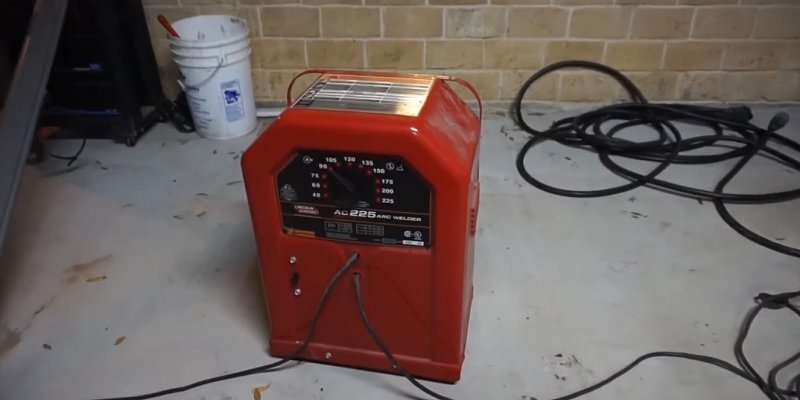
The Lincoln 225 Welder, also known as the Lincoln Electric AC-225, is a popular choice among welders because of its simplicity and durability. This machine is designed to provide efficient performance for a wide range of welding tasks, making it suitable for both professional welders and enthusiasts.
The AC-225 has a compact cabinet and weighs 109 lbs (49.5 kg), according to Lincoln. Its output range is 40 to 225 amps, and Lincoln rates it for 3/16 inch general purpose mild steel electrodes and 5/32 inch sizes of other electrodes.
Equipped with a heavy-duty transformer, the Lincoln 225 Welder provides consistent power output for stable and reliable welds. It operates on 230-volt single-phase input, making it compatible with most residential and commercial power sources.
Key Features and Benefits of the Lincoln 225 Welder
The Lincoln 225 Welder offers several key features and benefits that make it a popular choice among welders:
Easy to Use: The AC-225 is designed with user-friendly controls and a simple interface, making it easy to operate even for beginners.
Range of Uses: This welder is capable of handling a wide range of welding tasks, including mild steel, cast iron, and stainless steel, allowing you to tackle various projects with ease.
Durable Construction: With its heavy-duty transformer and sturdy build, the Lincoln 225 Welder is built to withstand demanding welding applications and last a long time.
Smooth Arc Performance: The AC-225 delivers a smooth and stable welding arc, resulting in clean and precise welds with minimal spatter.
Portable: At 109 lbs (Lincoln spec), the AC225 is compact for a transformer welder, but plan on moving it with help or a cart.
Rated Duty Cycle: Lincoln rates the US AC225 at 225 A, 25 V, and 20% duty cycle. That means about 2 minutes of welding in each 10-minute period at full output, so let the machine rest between long welds at high amps.
| Key Features | Benefits |
|---|---|
| Easy to Use | User-friendly controls make welding simple |
| Range of Uses | Capable of handling various welding tasks, allowing for increased project flexibility |
| Durable Construction | Built to withstand demanding welding applications for long-lasting performance |
| Smooth Arc Performance | Delivers clean and precise welds with minimal spatter |
| Portable | 109 lbs (Lincoln spec), so plan where it will sit near the outlet |
| Rated Duty Cycle | 20% at 225 A (Lincoln spec), about 2 minutes of welding per 10 minutes at full output |
Safety Precautions For Wiring A Lincoln 225 Welder
When it comes to wiring a Lincoln 225 Welder, safety should be your top priority. Working with electrical equipment requires caution and adherence to proper safety measures to prevent accidents and keep the installation smooth.
Three things matter here: the importance of safety precautions, the necessary safety gear, and how to prepare the work area for wiring the Lincoln 225 Welder. By following these guidelines, you can confidently wire your welder without compromising your safety.
Importance of safety precautions when working with electrical equipment
Working with electrical equipment, especially welders, can be hazardous if not approached with caution. Put safety precautions first to protect yourself from potential electrical shocks, fires, and other accidents. By taking the necessary safety measures, you minimize the risks associated with wiring a Lincoln 225 Welder and keep the working environment secure. Here are the essential safety precautions to follow:
Necessary safety gear for wiring a Lincoln 225 Welder
For your safety when wiring a Lincoln 225 Welder, it is vital to have the right safety gear to protect yourself against potential hazards. Here is a list of the necessary safety gear you should have:
Insulated gloves: Wearing insulated gloves will protect you from electric shocks and burns when handling electrical wires.
Protective eyewear: Safety goggles or glasses are essential to shield your eyes from sparks, dust, and debris that may occur during the wiring process.
Fire-resistant clothing: It is recommended to wear fire-resistant clothing to minimize the risk of clothing catching fire in case of any electrical mishaps.
Safety boots: Sturdy footwear with non-slip soles will prevent any slips, falls, or accidents that may occur when working with heavy equipment.
By equipping yourself with the necessary safety gear, you set the foundation for a safe working environment.
Preparing the work area for wiring the Lincoln 225 Welder
Before you begin wiring the Lincoln 225 Welder, prepare the work area appropriately. Taking the time to set up the area gives you a clean, organized, and safe workspace. Here are the steps to prepare the work area:
Clear the area: Remove any clutter or obstructions from the work area to create space for your welder and tools.
Provide proper ventilation: Adequate ventilation is essential to prevent the accumulation of toxic fumes or gases. Make sure the work area has proper ventilation to maintain a healthy environment.
Secure the equipment: Make sure your Lincoln 225 Welder is stable and securely positioned to prevent any accidental tipping or falling during the wiring process.
Organize your tools: Gather all the necessary tools and keep them within easy reach. This will save time and prevent tripping hazards caused by scattered tools.
By following these steps, you create a safe and well-prepared environment for wiring your Lincoln 225 Welder.
Remember, safety should always be your priority when working with electrical equipment. By knowing the importance of safety precautions, equipping yourself with the necessary safety gear, and preparing the work area properly, you can wire your Lincoln 225 Welder confidently and efficiently.
Step 1: Gathering The Required Tools And Materials
Before you start wiring your Lincoln 225 Welder, make sure you have all the necessary tools and materials at your disposal. Having everything you need on hand will save you time and frustration during the installation process. Here is a full list of tools and materials required for the task, plus some helpful tips so you are fully prepared before beginning.
List of tools and materials needed for wiring a Lincoln 225 Welder
Here is a breakdown of the tools and materials you’ll need to successfully wire your Lincoln 225 Welder:
| Tools | Materials |
|---|---|
|
|
Tips for having everything you need before starting
Review the Lincoln 225 Welder’s instruction manual: Familiarize yourself with the manufacturer’s guidelines for wiring the welder. The manual will specify the exact tools, wire gauges, and other materials required for the job.
Create a checklist: Prior to starting, create a checklist with all the tools and materials needed. This will help you confirm you haven’t missed anything and keep you organized throughout the process.
Inspect your tools: Before you begin wiring, make sure all your tools are clean, in good working condition, and suitable for the task at hand. Replace any damaged or worn-out tools for safety and efficiency.
Prepare a workspace: Set up a well-lit, clean, and organized workspace for the wiring process. Clear any potential hazards and make sure you have enough room to maneuver comfortably.
Double-check wire lengths: Check the length of electrical wires required for the installation. It’s essential to have wires of the appropriate length to reach the necessary connections without strain or excessive bending.
Have extra supplies on hand: Prepare for unexpected situations by having extra wire connectors, nuts, and electrical tape readily available. This will save you time in case any components need replacement.
Gathering the required tools and materials before starting the wiring process sets up a smooth and successful installation of your Lincoln 225 Welder. Being prepared saves time and means you have all the necessary resources to complete the task efficiently. Once you have everything you need, you’ll be ready to move on to the next steps of the wiring process with confidence.
Step 2: Reading The Wiring Diagram
Once you have gathered all the necessary tools and materials for wiring your Lincoln 225 Welder, study the wiring diagram closely before proceeding further. The wiring diagram works as a roadmap, providing a visual representation of how the different components of the welder are connected.
It helps you make the electrical connections correctly and prevent potential hazards. Here is why the wiring diagram for the Lincoln 225 Welder matters and what each component in the diagram does.
Importance of Reading the Wiring Diagram for the Lincoln 225 Welder
A clear grasp of the wiring diagram for your Lincoln 225 Welder is of utmost importance. This diagram acts as a guide, showing the exact electrical connections needed to safely wire the welder. It helps prevent wiring mistakes that could result in equipment malfunction, electrical shocks, or even fire hazards. By thoroughly grasping the wiring diagram, you can make sure all the electrical components are connected correctly, which supports good performance and longevity of your welder.
Detailed Explanation of the Different Components in the Diagram
Let’s examine the various components illustrated in the wiring diagram:
Power Source
The power source is the main supply of electricity for the welder. It is typically represented by a symbol that depicts where the electrical power originates.
Primary Circuit
The primary circuit consists of the power switch and the power cord. The power switch allows you to turn the welder on or off, and the power cord connects the welder to the main power supply.
Control Circuit
The control circuit is responsible for managing the different functions of the welder. It comprises control switches, relays, and other control components. On the AC225, the main setting is the output current, which Lincoln lists as 40 to 225 amps.
Secondary Circuit
The secondary circuit includes the transformer and secondary cables. The transformer converts the primary voltage to a lower voltage suitable for welding. The secondary cables deliver this transformed voltage to the electrode holder and workpiece.
Electrode Holder
The electrode holder is where the welding electrode is securely clamped. It allows the electrical current from the welder to pass through the electrode and produce the necessary heat for welding.
Workpiece Connection
The workpiece connection acts as the return path for the welding process. It lets electrical current flow and complete the circuit, forming a stable welding arc.
Knowing the different components depicted in the wiring diagram is essential when it comes to successfully wiring your Lincoln 225 Welder. With these components clear, you can proceed to the next step of the wiring process with confidence.
Step 3: Wiring The Power Supply
Guidance on connecting the power supply to the Lincoln 225 Welder
Properly wiring the power supply for your Lincoln 225 Welder is the base of its safe and efficient operation. Here is the process of connecting the power supply to your welder, one step at a time. If you are adding a new 240V circuit and receptacle, have a licensed electrician size the breaker and wire to the welder’s nameplate and your local electrical code.
Instructions for safely wiring the power supply
To safely wire the power supply for your Lincoln 225 Welder, you’ll need to follow these instructions:
First and foremost, make sure you have disconnected the power source. This step is vital for preventing accidental electric shocks.
Next, gather the necessary wiring materials. You will need a power cord appropriate for your welder’s voltage and amperage requirements. Choose the right gauge of wire, as inadequate sizing can lead to overheating and potential hazards.
Now, use wire strippers to remove the outer insulation of the power cord. Expose approximately 1 inch of the wire ends by carefully cutting through the outer layer.
Identify the power supply terminals on your Lincoln 225 Welder. These terminals are typically clearly labeled and should be visible near the power input section.
Refer to the user manual for your specific welder model to determine the appropriate terminals for connecting the power supply. It is essential to follow the manufacturer’s guidelines to avoid any risks.
Connect one hot conductor of your power cord securely to the L1 terminal. The US AC225 uses a NEMA 6-50P plug (Lincoln E2.30), and a NEMA 6-50 circuit has two hot conductors and a ground with no neutral. Make sure that the connection is tight and free from any loose strands of wire.
Connect the second hot conductor to the L2 terminal. Do not treat either hot wire as a neutral; both carry voltage on a 230V circuit.
Locate the grounding terminal and connect the equipment ground wire, usually green or bare copper, to this terminal. The NEMA 6-50P plug has a ground pin, so this connection is always required. Check that the connection is secure.
After all the connections are made, carefully inspect them to confirm there are no exposed wires or loose connections. Double-check that all the terminals are tightened properly.
Once you have completed the wiring process, you can safely connect the power supply to your Lincoln 225 Welder’s power source, following the guidelines provided by the user manual.
By carefully following these instructions, you have wired the power supply for your Lincoln 225 Welder. Remember, safety should always be your top priority when working with electrical connections. With the power supply properly connected, you are one step closer to your first weld.
Step 4: Wiring The Grounding System
Importance of a Proper Grounding System for the Lincoln 225 Welder
When it comes to operating a Lincoln 225 Welder, a proper grounding system is of utmost importance. The grounding system acts as a safety measure that prevents electrical shocks and reduces the risk of electrical malfunctions. It provides a safe pathway for electrical currents to flow into the earth, protecting both the machine and the welder from potential damage.
Step-by-Step Instructions for Wiring the Grounding System
Wiring the grounding system for your Lincoln 225 Welder is a key step in setting up the machine. Follow these step-by-step instructions for a proper and efficient grounding system:
Inspect the Work Area: Before you start wiring the grounding system, make sure the work area is clean and free from any debris or clutter. This will help prevent any accidental damage to the wires or the equipment.
Locate the Grounding Lug: The grounding lug is a metal connector on the welder made for connecting the grounding cable. It is usually marked with a symbol or the word “ground.” Locate this lug on your Lincoln 225 Welder.
Prepare the Grounding Cable: Cut a length of grounding cable that is suitable for your work area. Make sure the cable is long enough to reach the grounding point and has a suitable wire gauge to carry the required electrical current. Strip the ends of the cable to expose the bare wire.
Connect the Grounding Cable: Attach one end of the grounding cable securely to the grounding lug on your Lincoln 225 Welder. Make sure it is tightly connected for a proper electrical connection. If necessary, use a wrench or pliers to tighten the connection.
Find a Suitable Grounding Point: Look for a suitable grounding point near your work area. It can be a metal rod driven into the earth or a metal structure that is firmly grounded. Make sure the grounding point is secure and gives a low resistance path for electrical currents.
Secure the Other End of the Grounding Cable: Attach the other end of the grounding cable to the grounding point you have chosen. Make sure the connection is tight and secure, as a loose connection can compromise the effectiveness of the grounding system.
Inspect the Connections: After completing the wiring process, carefully inspect all the connections to confirm they are properly secured. Any loose or damaged connections should be fixed immediately to maintain the integrity of the grounding system.
By following these step-by-step instructions, you can wire the grounding system for your Lincoln 225 Welder efficiently and effectively. Remember, a proper grounding system is essential for the safe and efficient operation of your welding equipment.
Step 5: Connecting The Welding Leads
Now that you have set up the Lincoln 225 Welder and adjusted the settings according to your welding needs, it is time to connect the welding leads. The welding leads complete the welding circuit and deliver the welding current to the workpiece. Here is what each lead does and how to connect them to the machine.
Explanation of the Welding Leads and their Role in the Lincoln 225 Welder
The welding leads consist of two main components: the electrode lead (also known as the “stinger” or “torch lead”) and the work lead (also called the “ground lead” or “work clamp”). Each lead serves a distinct purpose in the welding process.
The electrode lead is the cable that connects the welding electrode or filler metal to the welding machine. It carries the welding current from the machine to the electrode, allowing the welder to control the arc and deposit the molten metal onto the workpiece. The electrode lead typically has a clamp at one end to securely attach the electrode.
The work lead connects the workpiece back to the machine and keeps the welding arc stable. It is connected to the welding machine and then clamped onto the workpiece, creating a closed circuit that allows the welding current to flow. The work lead is essential for achieving proper weld quality and minimizing electrical interference.
Instructions for Connecting the Welding Leads to the Machine
Follow these instructions to connect the welding leads to your Lincoln 225 Welder:
Locate the welding lead terminals on the machine. These are typically labeled “ELECTRODE” for the electrode lead and “WORK” or “GROUND” for the work lead.
Boldly grasp the electrode lead clamp and remove any insulation from the end of the cable to expose the metal conductor.
Insert the exposed conductor into the electrode lead terminal and fasten it securely. Double-check to make sure there are no loose connections.
Similarly, remove any insulation from the end of the work lead cable, exposing the metal conductor.
Insert the exposed conductor into the work lead terminal and fasten it securely.
Double-check all connections to confirm they are tight and properly aligned.
Once you have connected the welding leads to the Lincoln 225 Welder, you are ready to start welding. Always remember to follow safety precautions and wear appropriate protective gear for a safe and successful welding experience.
Now that you have completed step 5 and connected the welding leads, you have achieved an essential milestone in setting up your Lincoln 225 Welder. Your next job is to practice striking an arc on scrap metal before you weld a real part.
Proper Maintenance And Troubleshooting Tips
Tips for Maintaining the Lincoln 225 Welder for Optimal Performance
Proper maintenance of your Lincoln 225 welder keeps it performing well for a long time. By following a regular maintenance routine, you can prevent potential issues and get consistent results from your welding projects. Here are some tips to help you maintain your Lincoln 225 welder effectively:
Keep it clean and free from debris: Regularly clean your welder using a soft brush or cloth to remove any dust, dirt, or welding spatter that may accumulate. This helps prevent them from interfering with the machine’s performance and keeps it in proper working condition.
Inspect the cables and connections: Regularly check the cables and connections of your Lincoln 225 welder. Look for any signs of wear, fraying, or loose connections. If you notice any damage or loose connections, replace or repair them immediately to avoid any safety hazards.
Provide proper ventilation: Welding produces fumes and heat, so keep your workspace well ventilated. Proper ventilation helps dissipate harmful fumes, reduces the risk of overheating, and prevents the accumulation of dust or debris inside the welder.
Check the power supply: Make sure your Lincoln 225 welder is properly grounded and connected to a stable power source. Fluctuations in the power supply can affect the welder’s performance and lead to inconsistent welds. Use a dedicated power outlet with the appropriate voltage to avoid any power-related issues.
Inspect and replace consumables: On a stick welder like the AC225, the parts that wear are the electrode holder jaws, its insulation, and the work clamp. Regularly inspect them for signs of wear or damage. Replace any worn out or damaged parts right away for smooth and precise welding results.
Follow manufacturer’s guidelines: Always refer to the manufacturer’s guidelines and recommendations for maintenance and safety procedures. These guidelines provide specific instructions for your Lincoln 225 welder and help you get the best performance and keep you safe.
Common Troubleshooting Tips for Addressing Potential Issues
Even with proper maintenance, you may occasionally encounter issues with your Lincoln 225 welder. Knowing common troubleshooting tips can help you quickly address these problems and prevent any disruptions to your welding projects. Here are a few troubleshooting tips to keep in mind:
Check the welding parameters: If you’re experiencing inconsistent welds or poor penetration, verify that you’re using the correct welding parameters. On the AC225 that means setting the output current to the range the electrode maker recommends for the rod type and diameter.
Inspect the electrode holder and cables: A worn electrode holder or a damaged cable can lead to an unstable arc and poor weld quality. The AC225 is a stick welder with no wire feed system, so check the holder jaws, cable insulation, and cable lugs instead. Clean or replace any worn-out components as necessary.
Check the electrodes: Stick welding on the AC225 uses no external shielding gas, because the electrode coating provides the shielding. Damp or damaged electrodes can cause porosity in your welds, so store them dry and follow the electrode maker’s storage instructions.
Check the input power: A weak or unstable arc can also come from low input voltage. Confirm the outlet supplies 230V, and check that the breaker and supply wire match the welder’s nameplate. Have an electrician fix any supply problem.
Verify the ground connection: A poor ground connection can lead to erratic arc behavior and inconsistent welds. Make sure the workpiece is properly connected, and the ground clamp is securely attached to a clean and conductive surface.
Remember, safety should always be a priority when troubleshooting or performing maintenance on your Lincoln 225 welder. If you’re unsure about any repairs or troubleshooting steps, consult with a qualified technician or refer to the manufacturer’s guidelines for assistance. Following these maintenance and troubleshooting tips will help you maintain your Lincoln 225 welder in top condition and get strong welding performance for your projects.
Additional Safety Measures And Best Practices
When it comes to welding using the Lincoln 225 Welder, extra safety measures and good habits lead to a successful and safe welding operation. Here are the important safety precautions and best practices to keep in mind before you start welding.
Additional Safety Measures to Follow when Using the Lincoln 225 Welder
Welding can be a hazardous task if not carried out with caution and proper safety measures. To stay safe and avoid potential risks, here are some additional safety measures you should follow:
Wear Protective Gear: Prioritize your safety by wearing appropriate protective gear, including a welding helmet, safety glasses, flame-resistant clothing, welding gloves, and steel-toed boots. This shields you from any sparks, molten metal, or harmful rays emitted during the welding process.
Work in a Well-Ventilated Area: Welding produces harmful fumes and gases that can be hazardous to your health. Always work in a well-ventilated area to prevent the accumulation of these harmful substances. If working indoors, consider using exhaust fans or welding fume extractors to maintain a safe breathing environment.
Keep Fire Extinguishers Handy: Accidents can happen, so it’s essential to keep fire extinguishers nearby whenever you’re welding. Make sure they are easily accessible and properly maintained.
Inspect Your Equipment: Before starting any welding job, thoroughly inspect your Lincoln 225 Welder and all cables for any signs of damage or wear. Defective equipment can lead to accidents and compromise safety.
Remove Flammable Materials: Clear the welding area of any flammable materials, such as gas cans, solvents, or oily rags, that could easily ignite from sparks or heat generated during the welding process.
Best Practices for Effective and Safe Welding Operations
Following best practices keeps you safe and improves the quality and efficiency of your welding operations. Here are some best practices to keep in mind:
Make a Secure Ground Connection: To maintain a stable and safe electrical circuit, establish a secure ground connection by connecting the ground clamp to a clean metal surface. This helps prevent electrical shocks and maintains proper welding performance.
Use the Correct Welding Technique: To achieve strong and structurally sound welds, use the appropriate welding technique for the job at hand. Take the time to learn and practice various welding techniques to produce high-quality welds consistently.
Maintain a Suitable Welding Environment: Welding requires a clean and prepared surface for optimal results. Remove any rust, paint, or coatings from the metal surface before welding for proper penetration and weld strength.
Control Welding Parameters: Pay attention to the recommended welding parameters specified by the Lincoln 225 Welder’s manual for the specific type and thickness of the metal being welded. Properly setting the current helps prevent issues like overheating, weak welds, or distortion.
Perform Regular Equipment Maintenance: Keep your Lincoln 225 Welder in good working condition by performing regular maintenance, including cleaning, lubrication, and inspecting cables and connectors for any signs of damage. Well-maintained equipment supports safe and reliable welding operations.
By adhering to these additional safety measures and best practices, you can improve both your safety and the quality of your welding projects when using the Lincoln 225 Welder. Remember, safety should always be the top priority in welding, so never underestimate the importance of taking proper precautions.
Frequently Asked Questions On How To Wire A Lincoln 225 Welder?
What Plug Does A Lincoln 225 Welder Use?
Lincoln lists a NEMA 6-50P plug for the US AC225 (model K1170), which runs on 230V single-phase input, per spec sheet E2.30.
How Many Amps Does A Lincoln 225 Welder Pull?
Lincoln’s spec sheet lists 50 amps of input current at 230V when the AC225 runs at its rated 225 A output.
What Size Generator Do I Need To Run A 225 Amp Welder?
For the Lincoln AC225 at full rated output, 230 V x 50 A = 11,500 watts, so look for a generator that can supply about 11,500 running watts at 230V. That is the power needed to run a 225 amp welder like the AC225 at full output; lower amp settings need less.
How Thick Can A 225 Amp Welder Weld?
A 225 amp welder can weld thick materials, typically up to 1/2 inch in thickness.
Final Thoughts
Wiring a Lincoln 225 welder may seem complex at first, but with the right steps and guidance, it can be a straightforward process. By learning the electrical requirements, following safety precautions, and properly connecting the wires, you can count on effective and efficient operation of your welder.