Disclosure: This post contains affiliate links and I will be compensated if you make a purchase after clicking through my links. Learn More
Pulse MIG welding is a modern method that gives welders more control and higher quality results than standard MIG welding. If you want to use pulse MIG welding, you need to set your machine correctly. This is where a pulse MIG welding settings chart becomes useful. Many welders struggle to find the right settings for different metals, thicknesses, or positions. The wrong choice can lead to weak welds, too much spatter, or even damaged workpieces. This article will explain how to use a settings chart effectively, what each setting does, and how you can adjust them for the best results. You will also find tables and examples to help you set up your welder like a professional.
What Is Pulse Mig Welding?
Pulse MIG welding is a variation of MIG (Metal Inert Gas) welding. In this process, the welder sends pulses of electrical current instead of a steady flow. Each pulse melts a small drop of wire and transfers it to the weld pool.
In between pulses, the current drops to a low background level. This makes it easier to control heat input and spatter.
Main benefits of pulse MIG welding:
- Lower heat input reduces distortion.
- Less spatter means less cleaning.
- Better control over thin materials.
- Improved weld appearance.
Pulse MIG welding is popular for aluminum, stainless steel, and thin carbon steel. Many automotive, aerospace, and fabrication shops use pulse MIG for high-quality, repeatable welds.
Key Pulse Mig Welding Settings
A pulse MIG welding machine lets you control several settings. Each setting affects the weld in a different way. If you do not understand what these settings mean, you may struggle to produce good welds. Here are the most important settings on a pulse MIG welder:
- Pulse Frequency (Hz): How many pulses per second. Higher frequency means more control, but can make the arc less stable.
- Peak Current (A): The highest current during the pulse. This melts the wire and creates the drop.
- Background Current (A): The lower current between pulses. This keeps the arc stable but does not add much heat.
- Wire Feed Speed (WFS): How fast the wire feeds into the weld. This affects the amount of filler metal.
- Voltage (V): Controls the arc length and energy.
- Travel Speed: How fast you move the torch. Too fast or slow changes the weld shape and strength.
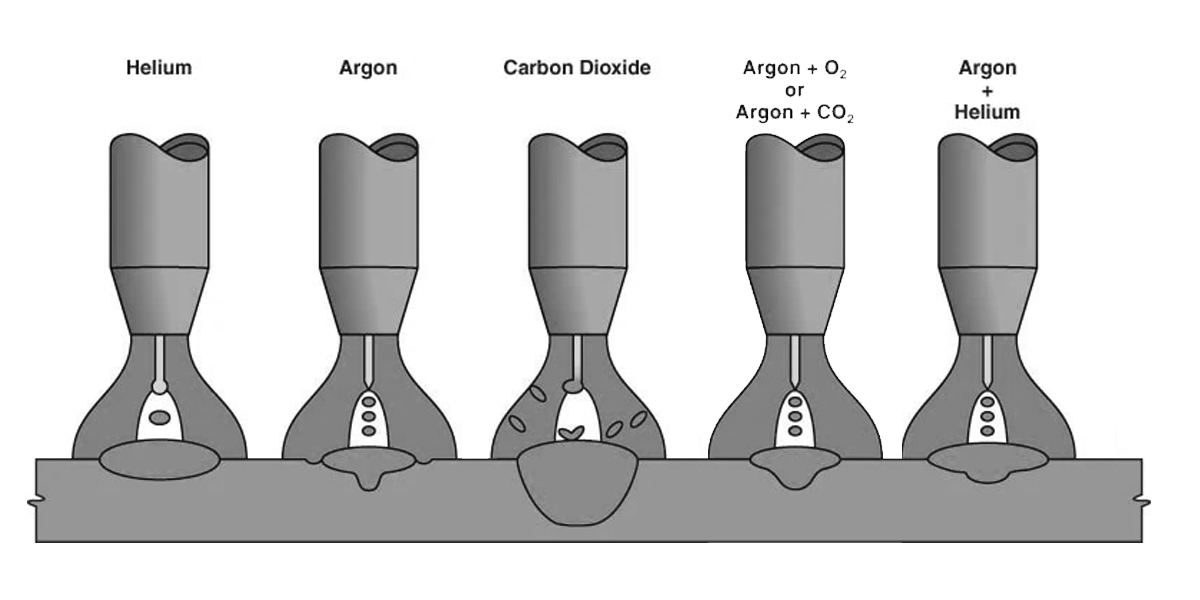
- Shielding Gas: The gas mixture protects the weld from air. Common gases are Argon or Argon/CO2 mixes.
- Inductance: Controls how smooth or sharp the arc is.
Understanding these settings helps you read and use a pulse MIG welding settings chart. Next, we will look at how each setting affects your weld.
Credit: www.perfectwelders.com
How Each Setting Influences The Weld
Pulse Frequency
Pulse frequency is usually between 30 and 400 Hz. If you set the frequency higher, you get smaller, more frequent drops. This can make the weld bead smoother, but too high a frequency may make the arc unstable. Lower frequencies create larger drops and can give deeper penetration.
Practical tip: For aluminum, a frequency of 50–150 Hz is common. For stainless steel, try 80–200 Hz.
Peak And Background Current
Peak current must be high enough to melt the wire but not so high that it burns through thin material. Background current should keep the arc stable without adding too much extra heat.
Example: If you weld 3 mm aluminum, you may set the peak current at 220 A and the background at 40 A.
Wire Feed Speed
Wire feed speed affects how much metal you add. If it is too high, the weld will build up and may look rough. If it is too low, you may get holes or weak joints.
Example: For 1.2 mm aluminum wire, start at 9–11 m/min.
Voltage
Voltage controls the arc length. Too high voltage gives a flatter, wider bead and more spatter. Too low voltage makes the bead tall and narrow.
Shielding Gas
The right gas protects the weld and can change the arc’s feel. For aluminum, pure argon is best. For steel, use an argon/CO2 mix like 92% argon, 8% CO2.
Inductance
Inductance affects how fast the current rises and falls. Higher inductance softens the arc and reduces spatter. Lower inductance gives a sharper, more forceful arc.
Why Use A Pulse Mig Welding Settings Chart?
A settings chart gives you recommended starting points for your machine. It saves time and helps avoid mistakes. Most charts list suggested settings for:
- Metal type (aluminum, steel, stainless steel)
- Material thickness
- Wire size
- Shielding gas
Charts often show ranges instead of exact numbers. This is because each machine and job is a bit different. Use the chart as a guide, then fine-tune based on your results.

Credit: www.arccaptain.com
Example Pulse Mig Welding Settings Chart
To make things practical, here’s a sample chart with recommended settings for common materials. Always check your machine’s manual for exact details.
| Material | Thickness (mm) | Wire Diameter (mm) | Pulse Frequency (Hz) | Peak Current (A) | Background Current (A) | Wire Feed Speed (m/min) | Voltage (V) | Shielding Gas |
|---|---|---|---|---|---|---|---|---|
| Aluminum | 1.5 | 1.0 | 70 | 140 | 30 | 6.5 | 21 | Argon |
| Aluminum | 3.0 | 1.2 | 100 | 220 | 40 | 10.0 | 23 | Argon |
| Mild Steel | 1.5 | 0.8 | 50 | 110 | 20 | 3.5 | 18 | Ar/CO2 92/8 |
| Mild Steel | 3.0 | 1.0 | 70 | 160 | 30 | 6.0 | 20 | Ar/CO2 92/8 |
| Stainless Steel | 2.0 | 1.0 | 120 | 150 | 35 | 7.0 | 20.5 | Argon + 2% CO2 |
These numbers are starting points. You should always do a test weld and adjust for your needs.
How To Read And Use A Settings Chart
A good pulse MIG welding settings chart lets you match your metal type and thickness to the right settings. Here is a step-by-step example:
- Find your material type (e.g., aluminum).
- Find your material thickness (e.g., 3.0 mm).
- Look up the recommended wire size.
- Set your pulse frequency and current to the chart’s numbers.
- Adjust wire feed speed and voltage to the suggested range.
- Select the right shielding gas.
- Make a test weld.
- Fine-tune settings as needed.
Non-obvious insight: Many beginners only use the chart and do not adjust further. A chart is a starting point, not a rulebook. If your weld looks too tall or has undercut, small tweaks can make a big difference.
Pulse Mig Welding Settings For Different Metals
Each metal has its own needs. The settings for aluminum are different from steel or stainless steel. Here’s what you need to know for each:
Aluminum
Aluminum needs higher travel speed and more heat than steel. Pure argon is the best gas. Keep your torch angle steady and clean the metal well before welding.
Settings tips:
- Pulse frequency: 70–150 Hz
- Peak current: 130–250 A (depending on thickness)
- Background current: 25–50 A
- Wire feed speed: 6–12 m/min (for 1.0–1.2 mm wire)
- Voltage: 20–24 V
Mild Steel
Steel is easier to weld than aluminum. Use an argon/CO2 mix. Steel needs less heat, so keep your settings lower.
Settings tips:
- Pulse frequency: 50–100 Hz
- Peak current: 110–180 A
- Background current: 20–40 A
- Wire feed speed: 3–7 m/min (0.8–1.0 mm wire)
- Voltage: 18–21 V
Stainless Steel
Stainless steel is sensitive to heat. Too much heat can cause warping or discoloration. Use argon with a small amount of CO2.
Settings tips:
- Pulse frequency: 80–180 Hz
- Peak current: 120–200 A
- Background current: 30–50 A
- Wire feed speed: 5–9 m/min (1.0 mm wire)
- Voltage: 19–22 V
Pulse Mig Settings By Material Thickness
Material thickness is one of the most important factors in choosing your settings. Thin metal can burn through if you use too much heat, while thick metal may not melt well if you use too little. Here is a table to help you pick the right starting point based on thickness:
| Thickness (mm) | Material | Wire Size (mm) | Pulse Frequency (Hz) | Peak Current (A) | Wire Feed Speed (m/min) | Voltage (V) |
|---|---|---|---|---|---|---|
| 1.0 | Aluminum | 1.0 | 70 | 120 | 5.5 | 19.5 |
| 2.0 | Aluminum | 1.0 | 100 | 180 | 8.0 | 22 |
| 3.0 | Aluminum | 1.2 | 120 | 240 | 12.0 | 24 |
| 1.0 | Mild Steel | 0.8 | 50 | 100 | 3.0 | 17.5 |
| 2.0 | Mild Steel | 1.0 | 70 | 150 | 5.5 | 19.5 |
| 3.0 | Mild Steel | 1.0 | 90 | 180 | 7.0 | 21 |

Credit: www.mig-welding.co.uk
How To Fine-tune Your Pulse Mig Settings
Even with a chart, you may need to adjust your settings. Every machine, environment, and project is a little different. Here are some expert tips to fine-tune your welds:
- Listen to the arc: A smooth, soft “buzz” is a good sign. Loud pops or hissing means settings are off.
- Watch the bead: The weld should look even, with no holes or excessive buildup.
- Check penetration: Cut a test weld and look at the cross-section. The bead should fuse with the base metal.
- Adjust one setting at a time: If you change too much at once, it is hard to see what made the difference.
- Control your torch angle: Keep the angle steady to avoid inconsistent welds.
- Weld position matters: Overhead and vertical welding may need lower wire speed and voltage.
Non-obvious insight: Many beginners overlook the effect of humidity and temperature. Moisture can cause porosity. If you weld outdoors or in a damp shop, dry your wire and store it properly.
Common Problems And Solutions In Pulse Mig Welding
Even experienced welders face problems. Here are some common issues and how to fix them:
Excessive Spatter
- Possible causes: Too high voltage, low inductance, or wrong shielding gas.
- Solution: Lower voltage, increase inductance, and use recommended gas.
Burn-through (holes In Weld)
- Possible causes: Too high peak current, slow travel speed, or thin material.
- Solution: Lower peak current, increase travel speed, and use a backing bar for thin pieces.
Poor Fusion
- Possible causes: Low peak current or wire feed speed, dirty base metal.
- Solution: Increase peak current and wire speed. Clean the metal before welding.
Porosity (bubbles In Weld)
- Possible causes: Contaminated gas, dirty material, or high humidity.
- Solution: Check gas flow, use clean metal, and keep wire dry.
Inconsistent Bead
- Possible causes: Unsteady hand, wrong voltage or wire feed speed.
- Solution: Practice steady torch movement. Adjust voltage and wire speed.
Comparison: Pulse Mig Vs. Standard Mig
Many people ask how pulse MIG differs from standard MIG. Here is a side-by-side comparison:
| Feature | Pulse MIG | Standard MIG |
|---|---|---|
| Heat Control | High (less distortion) | Lower (more distortion) |
| Spatter | Low | High |
| Thin Material | Excellent | Difficult |
| Weld Appearance | Smooth, clean | Less smooth |
| Cost | Higher (machine cost) | Lower |
| Setup Complexity | More settings | Simple |
Pulse MIG is best for jobs where appearance and control matter. Standard MIG is easier to set up and cheaper, but you get more spatter and less control.
Safety Tips For Pulse Mig Welding
Welding always brings some risks. Pulse MIG is safer than stick welding in some ways, but you must still protect yourself.
- Wear a welding helmet with auto-darkening lens.
- Use gloves and a flame-resistant jacket.
- Ventilate your workspace to avoid breathing fumes.
- Keep flammable items away from your work area.
- Check your machine’s cables for wear or damage.
- Never touch the wire or tip when the machine is on.
Pulse Mig Welding For Special Applications
Some jobs demand special settings or approaches. For example:
Welding Aluminum Boat Hulls
Boat hulls need strong, clean welds with little distortion. Use higher pulse frequency and a fast travel speed to avoid heat buildup.
Automotive Bodywork
Automotive panels are thin and warp easily. Lower your peak current and use multiple short welds rather than a long bead.
Stainless Steel Pipes
Pipe welding often means working in tight spaces. Use a small nozzle and lower wire speed for better control.
How To Create Your Own Pulse Mig Settings Chart
Many welders end up creating a personal chart based on their experience. Here’s how you can do it:
- Record your settings every time you make a good weld.
- Note the material type, thickness, and position.
- Include details like wire type and diameter, gas mix, and even shop temperature.
- Update your chart as you try new settings and materials.
- Share with your team so everyone benefits.
This habit saves time and makes training easier.
Pulse Mig Welding Settings For Different Positions
Weld position can change your settings. Flat welding lets you use higher wire speed and voltage. Vertical or overhead welding needs more control.
- Flat: Standard settings from the chart.
- Vertical: Lower wire feed speed and voltage. Use a push angle for better control.
- Overhead: Even lower wire speed and voltage. Short, controlled welds are best.
Practicing in each position is the best way to find the right settings.
Advanced Tips For Better Pulse Mig Welding
- Use a clean, dedicated liner for aluminum wire. Aluminum is soft and jams easily.
- Keep your contact tip size correct. Too big or small affects current flow.
- Check your gas flow regularly (usually 15–20 L/min).
- Avoid long extension cords. Voltage drop can affect your arc.
- Let the machine cool down between long welds to prevent overheating.
Expert tip: Welders often ignore the effect of torch cable length. Longer cables can create more resistance and affect your arc. Use the shortest cable that is practical.
Where To Find Reliable Pulse Mig Welding Settings Charts
Most major welding machine brands publish charts for their machines. You can find them in manuals, on the company website, or printed on a sticker inside the machine cover. For extra help, you can visit Miller Welds for calculators and charts from a trusted source.
Frequently Asked Questions
What Is The Main Advantage Of Pulse Mig Welding?
The main benefit is better control over heat and spatter. This lets you weld thin metals with less risk of burning through, and it gives a cleaner, smoother bead.
Can I Use A Standard Mig Machine For Pulse Mig Welding?
No, you need a machine with a pulse function. Standard MIG machines do not have the electronics needed for pulse control.
What Happens If I Use The Wrong Shielding Gas?
Using the wrong gas can cause porosity, spatter, or weak welds. Always use the gas recommended for your material.
How Do I Know If My Settings Are Correct?
Your weld bead will look smooth and even, with little spatter or holes. The arc will sound steady, not harsh or popping.
Is Pulse Mig Welding More Expensive Than Regular Mig?
Yes, pulse MIG machines cost more and take longer to set up, but they save time in cleanup and produce higher quality welds.
Pulse MIG welding is a powerful tool for anyone who needs strong, clean, and precise welds. Using a pulse MIG welding settings chart helps you start with the right settings. Always fine-tune for your project, and keep learning from your results. With practice and careful setup, you will get the most out of your machine and produce welds you can trust.