Disclosure: This post contains affiliate links and I will be compensated if you make a purchase after clicking through my links. Learn More
A Hobart welder that will not feed wire can bring any welding job to a sudden stop. This issue frustrates both beginners and experienced welders. You might hear the machine running, but the wire just will not move. Sometimes, the wire moves a little, then jams.
Other times, there is no movement at all. Many people think the problem is very big, but often it is something simple and easy to fix. Understanding how to troubleshoot a Hobart welder that will not feed wire can save you time, money, and stress.
This article will give you a clear, step-by-step approach to find and fix the reasons why your Hobart welder will not feed wire. You will learn about the most common causes, how to check each one, and what to do next.
You will also learn a few non-obvious tips that can make your troubleshooting easier and faster. By the end, you will feel confident to solve this problem on your own.
Understand How A Hobart Wire Feeder Works
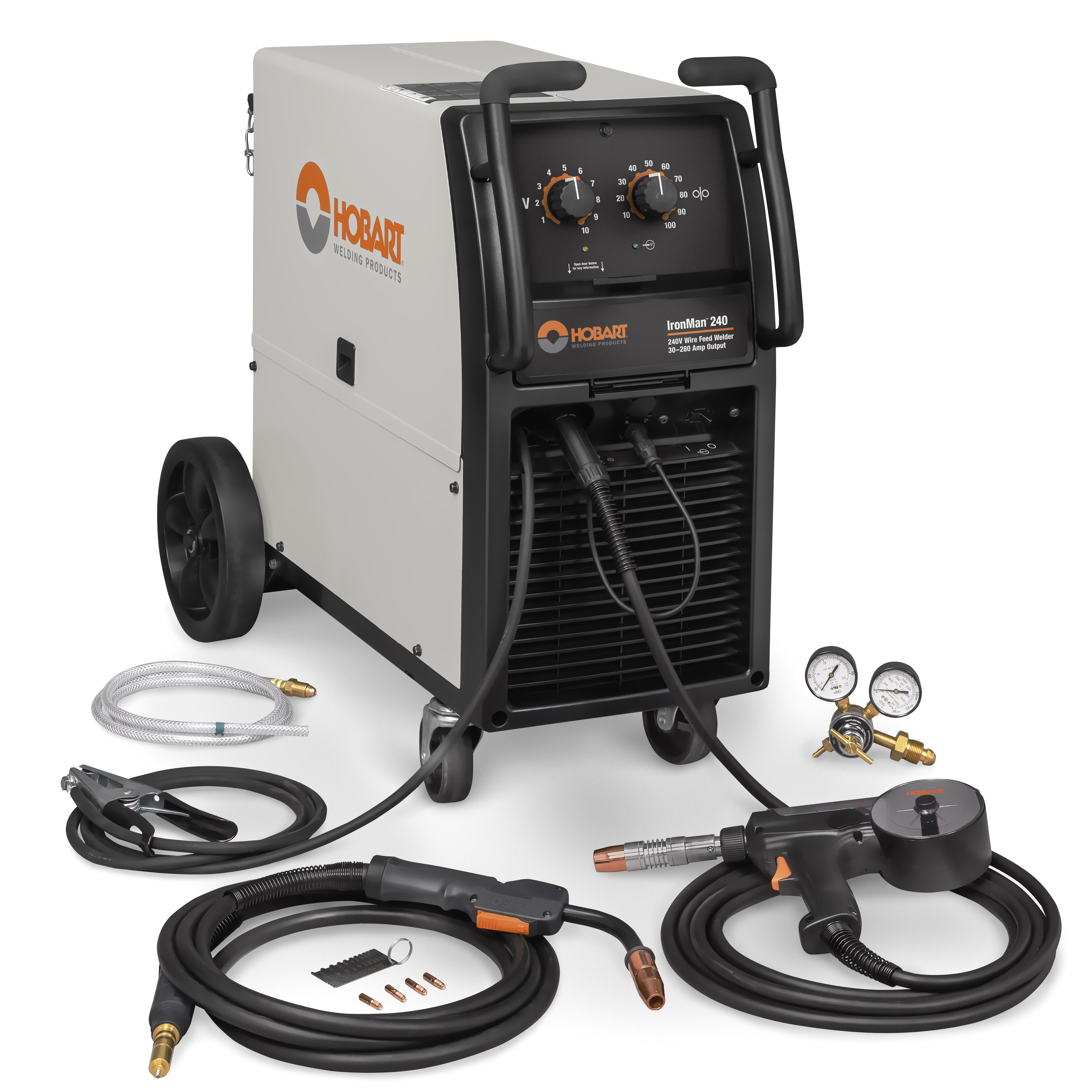
Before you start troubleshooting, it helps to know how a Hobart welder feeds wire. The wire feeder system has several main parts:
- Wire spool: Holds the welding wire.
- Drive rolls: Pull the wire from the spool and push it into the welding gun.
- Wire feed motor: Powers the drive rolls.
- Wire liner: Guides the wire inside the welding gun cable.
- Contact tip: The last point the wire touches before the arc.
When you pull the trigger, the wire feed motor turns, making the drive rolls spin and push the wire through the liner and out the contact tip. If any part of this system fails, the wire may not feed.
Common Reasons A Hobart Welder Will Not Feed Wire
Many things can cause wire feed issues. Here are the most common problems:
- Wire spool is empty or jammed
- Drive roll tension is wrong
- Drive rolls are worn or dirty
- Wire is tangled or kinked
- Liner is clogged or worn
- Contact tip is blocked
- Wrong wire size or type
- Faulty wire feed motor
- Loose or broken wiring
- Trigger or gun switch failure
- Bad ground connection
- Control board or electronics fault
Next, you will see how to check and fix each problem.
Credit: www.hobartwelders.com
Step-by-step Troubleshooting Process
Fixing a wire feed issue is easier if you follow a clear process. Start with the simplest problems, then move to more complex checks.
1. Check The Wire Spool
Many people forget the basics. If the wire spool is empty, the wire will not feed.
- Open the welder side panel.
- Look at the spool. Is there wire left?
- If empty, replace with a new spool of the correct size and type.
- If wire is present, check if the wire comes off the spool easily. Sometimes the wire gets tangled or stuck.
Tip: Make sure the spool tension nut is not too tight. The spool should turn smoothly but not spin freely and unravel wire.
2. Inspect For Tangled Or Kinked Wire
Wire can tangle at the spool, or kink as it enters the drive rolls.
- Pull a short length of wire by hand (with the welder off). If it sticks or feels rough, look for tangles or kinks.
- Cut away damaged wire with wire cutters.
- Re-thread fresh wire through the drive rolls and into the liner.
Non-obvious insight: Even a small bend or twist in the wire can stop it from moving smoothly through the liner. Always trim off any bent parts before re-feeding.
3. Check Drive Roll Tension
Drive rolls push the wire. If the tension is too loose, the rolls slip. If too tight, the wire gets crushed.
- Find the tension adjustment knob near the drive rolls.
- With the welder off, press the trigger and watch the rolls (do not weld).
- If wire does not move or slips, tighten the tension slightly and try again.
- If the wire is crushed or flat, loosen the tension a bit.
Practical tip: Mark the original tension setting before you adjust, so you can go back if needed.
4. Clean Or Replace Drive Rolls
Dirty or worn drive rolls cannot grip the wire.
- Remove the drive rolls by loosening the set screw.
- Inspect for grooves filled with dirt or metal shavings.
- Clean with a wire brush or replace if worn smooth.
Comparison of drive roll types:
| Drive Roll Type | Best For | Common Problems |
|---|---|---|
| V-Groove | Solid wire | Slipping if dirty |
| Knurled | Flux-core wire | Wire damage if tension too high |
| U-Groove | Soft wire (aluminum) | Wire crushing if tension wrong |
Always use the correct drive roll type for your wire.
5. Inspect The Wire Liner
The liner can clog with dirt, metal dust, or rust from the wire.
- Remove the gun from the machine (follow your Hobart manual).
- Take out the liner.
- Blow compressed air through the liner, or replace if clogged or kinked.
Non-obvious insight: Liners last much longer if you use clean, rust-free wire and store wire spools in a dry place.
6. Check The Contact Tip
The contact tip guides the wire and delivers current. A blocked tip stops wire movement.
- Unscrew the tip from the end of the gun.
- Try to pass the wire through the tip by hand.
- If blocked, replace with a new tip of the correct size.
Tip: Always match the contact tip size to the wire diameter. For example, use a 0.030” tip for 0.030” wire.
7. Confirm Correct Wire Size And Type
Using the wrong wire size or type can cause feed problems.
- Check the wire spool label for size (such as 0.030” or 0.035”).
- Make sure it matches the contact tip, liner, and drive rolls.
- Use solid wire for MIG welding, flux-core for self-shielded applications.
Data on wire compatibility:
| Wire Size | Matching Tip Size | Matching Liner |
|---|---|---|
| 0.023” (0.6mm) | 0.023” | 0.023”–0.030” |
| 0.030” (0.8mm) | 0.030” | 0.030”–0.035” |
| 0.035” (0.9mm) | 0.035” | 0.035”–0.045” |
Even a small mismatch can make the wire stick inside the liner.
8. Test The Wire Feed Motor
If you checked all above and the wire will still not feed, the motor may have failed.
- Listen for a motor sound when you pull the trigger. No sound means possible electrical or motor fault.
- With the welder off, turn the drive rolls by hand. If they turn smoothly, the motor is likely not jammed.
- If the motor does not run, check for loose wires or burned smell.
A replacement motor may be needed if it shows no response.
9. Inspect Wiring And Connections
Loose or broken wires can stop the wire feed.
- Unplug the machine.
- Open the side and check all wire connectors from the control board to the drive motor.
- Look for burnt or loose terminals.
- Tighten or repair as needed.
Non-obvious insight: Movement and vibration can loosen connections over time, even if the machine looks fine from outside.
10. Check The Trigger And Gun Switch
The gun trigger sends a signal to feed wire.
- Squeeze the trigger. Does the wire feed at all?
- If not, try a different gun (if you have one). If the new gun works, the old gun or trigger switch is faulty.
- Many Hobart welders let you test the switch with a multimeter (check manual).
Replace the trigger or gun if it is faulty.
11. Verify Ground Connection
A bad ground can cause power problems that affect wire feeding.
- Check the ground clamp. Clean any rust or dirt.
- Clamp to clean, bare metal.
- Inspect the ground cable for cuts or breaks.
A strong ground connection helps both wire feed and welding arc.
12. Control Board Or Electronics Failure
If all mechanical parts work but the wire still will not feed, the problem could be with the control board.
- Signs: No response from motor, but the machine powers on.
- Some boards have fuses. Check and replace if blown.
- If you suspect board failure, contact a qualified technician or Hobart service center.
Important: Do not try to repair electronic boards yourself unless you are trained. You could damage the machine or risk electric shock.
Preventive Maintenance Tips
You can avoid many wire feed problems with regular care:
- Store wire spools in a dry place to prevent rust.
- Clean drive rolls and liner every few months.
- Use compressed air to blow out dust from the machine.
- Replace contact tips and liners before they fail.
- Inspect cables and connections often.
Data shows: Welders who clean their machines monthly report 30% fewer wire feed problems than those who do not.
How To Tell If The Problem Is Electrical Or Mechanical
Sometimes it is hard to tell if the problem is with moving parts or with the machine’s electrical system. Here are some ways to check:
- If the wire will not move but you hear the motor, the problem is likely mechanical (drive rolls, liner, tip, wire).
- If you do not hear the motor at all, start checking electrical parts (trigger, wiring, control board).
- If you try to feed wire by hand and it moves easily, the path is clear.
Practical tip: Many beginners replace expensive parts before checking simple things like the contact tip or liner. Always check the cheap, easy fixes first.
How To Set Drive Roll Tension Correctly
Setting the right drive roll tension is important. Too loose, and the wire will slip. Too tight, and the wire will flatten or the drive motor will wear out.
Follow this simple method:
- Thread the wire through the gun and out the tip.
- Place a small block of wood or metal against the tip.
- Press the trigger. The wire should bend against the block but not slip in the drive rolls.
- If it slips, tighten the tension a little at a time.
- If the wire is crushed, loosen the tension.
This method works for most wire types and sizes.

Credit: www.youtube.com
Signs Of A Bad Wire Liner
A bad liner can cause the wire to:
- Feed slowly or stop suddenly
- Feel rough when pulled by hand
- Kink or jam inside the gun cable
If you notice these signs, replace the liner. Liners are cheap and make a big difference in wire feeding performance.
The Importance Of Using The Right Wire
Many wire feed issues come from using the wrong type or size of wire. Always:
- Use wire that matches the drive rolls, tip, and liner
- Avoid rusty or old wire
- Store wire spools in sealed bags when not in use
Example: Using 0.035” wire with a 0.030” tip can cause jams and erratic feeding.
Troubleshooting With A Multimeter
A simple multimeter can help you check switches and wiring.
- Unplug the machine.
- Set the meter to continuity mode.
- Test the trigger switch for open/close function.
- Check for voltage at the drive motor terminals (refer to your manual for correct values).
If you are not sure how to use a multimeter, many Hobart manuals have step-by-step guides.
What To Do If Nothing Works
If you have checked everything and the wire still will not feed:
- Double-check each step. Sometimes a small issue is missed.
- Try a different spool of wire.
- Call a Hobart authorized service center.
- Do not keep running the machine, as this can cause more damage.
When To Seek Professional Help
Some problems are best left to experts:
- Control board or electronics failure
- Motor replacement (if you are not comfortable)
- Complex wiring issues
Trying to fix these yourself can risk safety and damage the machine. Authorized service centers have the right tools and parts.
Table: Quick Troubleshooting Reference
Here is a handy summary to help you find the problem fast:
| Symptom | Possible Cause | What to Check |
|---|---|---|
| No wire movement, motor silent | Electrical fault | Trigger, wiring, motor, control board |
| Wire feeds but stops suddenly | Tip or liner blockage | Contact tip, liner, drive roll tension |
| Wire slips or is crushed | Drive roll tension | Adjust tension, check roll type |
| Wire moves slowly | Dirty rolls or liner | Clean rolls, replace liner |
| Wire feeds with jerks | Tangled/kinked wire | Check spool, trim wire, re-thread |

Credit: www.youtube.com
Frequently Asked Questions
Why Does My Hobart Welder Wire Feed Stop After A Few Seconds?
This usually means the wire is blocked or jammed. Check the contact tip, liner, and for tangles at the spool. Also, see if the drive roll tension is set too loose or too tight.
How Often Should I Replace The Liner In My Hobart Welder?
Most users should replace the liner every 6-12 months, depending on usage and wire quality. If you notice rough wire feed or jams, replace it sooner.
Can I Use Any Contact Tip Size With My Wire?
No, you must match the contact tip size to your wire diameter. Using the wrong size can cause feed issues or arc problems.
What Is The Best Way To Store Welding Wire?
Keep wire spools in a dry, sealed bag or container. Moisture causes rust, which leads to liner clogs and feed problems.
Where Can I Find Official Hobart Welder Troubleshooting Guides?
You can find official support and manuals on the Hobart Welders Support website.
A Hobart welder that will not feed wire is a common problem, but it rarely means your machine is broken for good. By checking each part in order—from the spool and rolls to the liner, tip, and electrical system—you can find and fix most issues yourself.
Regular maintenance and using quality wire can prevent many problems before they start. By following the guidance in this article, you can get back to welding with less frustration and more confidence.